Question: Can this be disabled? Swiping up, jump list menu appears
There's a 7+ Taskbar Tweaker a mechanic that I keep accidentally triggering and would like to know if there's any way to turn it off.
Basically, I have the taskbar that when I right click, I get the "standard window menu". However, I keep accidentally getting the "jump list" menu by left-clicking. I work really fast and I'm always moving and dragging the mouse pointer around and I found out that if you hold the left-mouse button and drag up, the "jump list" menu appears.
I found a thread saying that you could modify the registry:
"Set the following DWORD value to 1:
Branch:
HKEY_CURRENT_USER\Software\7 Taskbar Tweaker\OptionsEx
Name:
jump_list_drag_disable"
But such name doesn't appear.
Another post said: "Update: v4.2 has a checkbox for disabling jump lists that appear by dragging."
But I'm using version 5.15 and I don't see such option.
So, is there a way to turn this off?
Thanks!

You can access the Advanced Options from the main window context menu, or from the tray icon menu.
From there, you can find drag_towards_desktop and set it to 1.

 Discord Sound Control Doesnt work
 when you scroll wheel full down doesnt mute or sound levels dont apply


 Feature to disable taskbar page switching when switching windows
When you have a taskbar with multiple pages of icons, it will automatically switch pages when you switch into a window whose icon is on a different page. It would be very useful to be able to turn off this annoying behavior.
Allow for start or end title justification (extend to regexp)
Some windows, eg: file explorer, have useful data in their title.
Typically towards the end.
I run 6-20 file explorer windows and it would be nice to see the target directory (right justified title) without hovering
More complex filtering could cater to more arcane situations.
HELP ME PLEASE
i even removed the volume controls from windhawk but its sdtill not doing anything no matter where i scroll it ends up changing the volume its so annoyimg i cant even use mmy SCROL WHEEL
The latest version of Firefox doesn't show any standard window menu if selected as default.
the Jump menu in Firefox works correctly, but the standard menu doesn't show anymore. Seems like an incompatibility with the latest Firefox version?
See my answer here:
https://tweaker.userecho.com/topics/858-standard-window-menu-on-right-click-not-display ed

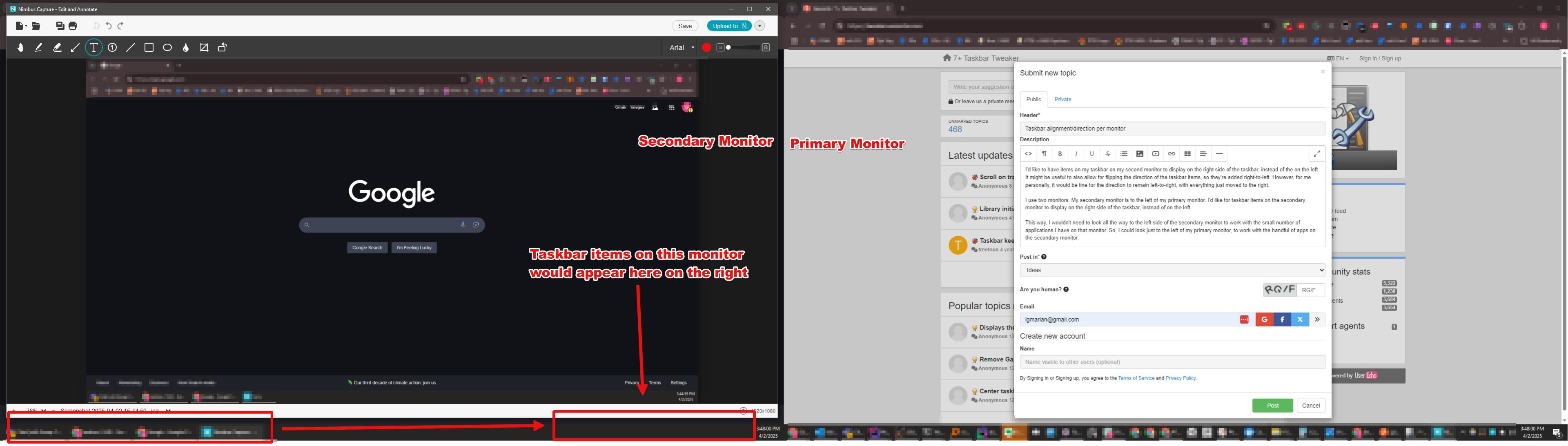
Taskbar alignment/direction per monitor
I'd like to have items on my taskbar on my second monitor to display on the right side of the taskbar, instead of the on the left. It might be useful to also allow for flipping the direction of the taskbar items, so they're added right-to-left. However, for me personally, it would be fine for the direction to remain left-to-right, with everything just moved to the right.
I use two monitors. My secondary monitor is to the left of my primary monitor. I'd like for taskbar items on the secondary monitor to display on the right side of the taskbar, instead of on the left.
This way, I wouldn't need to look all the way to the left side of the secondary monitor to work with the small number of applications I have on that monitor. So, I could look just to the left of my primary monitor, to work with the handful of apps on the secondary monitor.
Reclaim Startbutton space on second screen
The "Hide the Start button" option forgets to reclaim the Start button space on the second screen. So that space where the button was stays empty and can't be used by taskbar icons.
The one on the main monitor is removed and the icons can use that space, but the second monitor taskbar doesn't free up that space for icons.
Customer support service by UserEcho