
 please, delay option for hovering list
please, enable an option for delay for hovering list;
and, if possible, an option to skip immidiateley to the selected
hovering window from the taskbar
ThankYou!

7+ Taskbar Tweaker: Feature request: Also Control Volume possible if mouse over taskbar, also when further apps are in FullScreen mode
7+ Taskbar Tweaker: Feature request: Also Control Volume possible if mouse over taskbar, also when further apps are in FullScreen mode
While fullscreen mode in further software, till now, it is not possible to change volume.
Many thanks
Kind regards
info_mailing0815@yahoo.de
 Bug: "Combine grouped buttons" doesn't work with vertical taskbar on Windows 10 21H2+ [v5.15.1]
Video example: https://files.catbox.moe/8avg7r.mp4
The same configuration works fine on both my Win7 host PC and an 8.1 VM, so I'm fairly certain this is specific to the Win10 taskbar. Also, while I didn't update this specific VM, the same issue occurs on whatever the latest build of 21H2 is.

It's a known limitation (which I forgot about and had to spend some time to investigate and remember).
It never worked in Windows 10, and I addressed it here:
https://ramensoftware.com/7-taskbar-tweaker/comment-page-47#comment-11969
tl;dr:
- In Windows 10, due to the way the combining functionality is implemented, it only works on a horizontal taskbar.
- Workaround: Set the taskbar to “Always combine, hide labels” in system taskbar properties. Then set the “show_labels” advanced option of the tweaker to “2”. Finally, select “Don’t combine grouped buttons” if that’s the default configuration you prefer.

doesnt preserve pinned icons order
Hi Mike!
Thanks for the great utility! I hope you'll resolve my concern.
When I exit from 7+TT and run an application pinned to the task bar - its icon stays at the same position:
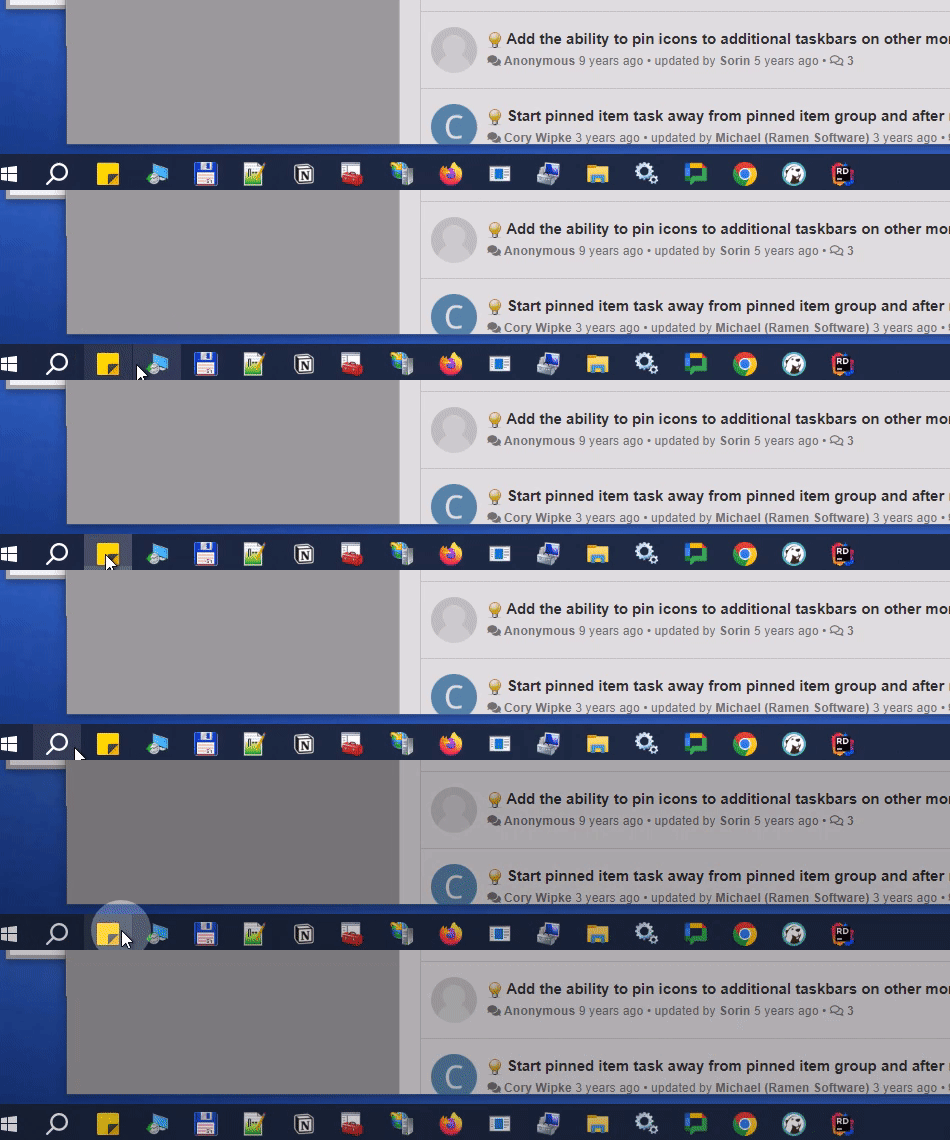
But, if 7+TT is running - the icon jumps to the right:

Here are my 7+TT settings:
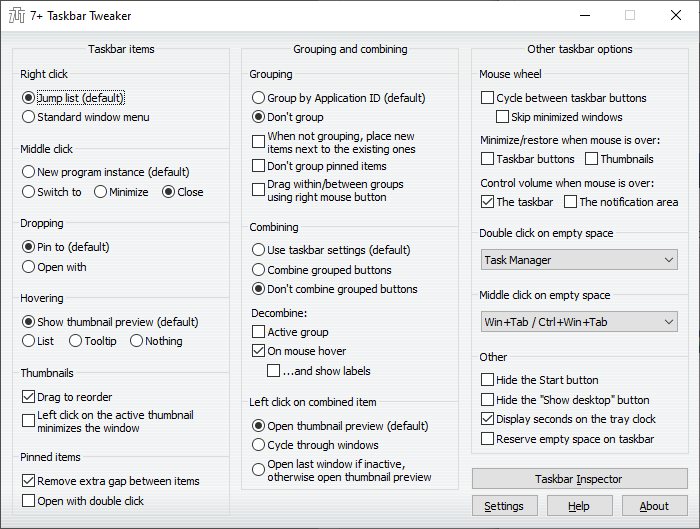
Thanks in advance!
Option to place the taskbar item adjacent to the parent?
Can't find it, but is there an option to place the taskbar item adjacent to the parent? Something like "When not grouping, place new items next to the existing ones" but on the right side of caller program.

Программа 7+ Taskbar Tweaker в автозагрузке.
При загрузке системы программа 7+ Taskbar Tweaker находясь в автозагрузке запускает окно своих настроек, а хотелось бы чтобы только в трее.
Вы можете использовать параметр командной строки «-hidewnd». Вообще, он добавляется автоматически при установке. Возможно, вы настроили автозагрузку вручную или используете портабельную версию.
Two identical machines, one can cycle through any open app. The other gets stuck.
I have a strange, and frustrating problem for this amazing software.
Two identical machines (2023 razer 14 laptops). Identical windows versions, updates, drivers, etc. I can cycle through all the open windows with "cycle between taskbar buttons" on machine A, but it will not operate the same on machine B. For machine B, it cycles through any open window just fine, but stops when it gets to the video game Everquest. After it hard stops at the first instance of Everquest, it can not cycle past it. Machine A, meanwhile, has no problem cycling through any open window, including many instances of Everquest.
It wouldn't be such a huge deal if this wasn't my job. I have spent the past two days banging my head, trying to match up every setting in the book (7tt, windows, and Everquest) to no avail. I have reinstalled 7tt many times. I have tried beta version. Thoughts? Any help would be greatly appreciated. Thank you for your time
Option to remove Taskbar Scrollbar that appears when I have more than 1 row of icons in taskbar?
Hi, is there any way to add an option that let's us remove the Scrollbar that appears when I have more than 1 row of icons in taskbar? I would also like option to prevent scrolling into completely blank rows. Why does Windows let me scroll into nothingness?


Bug: sometimes, left click launches new window rather than switching among existing windows
Periodically, when I click on the taskbar button, instead of switching to the task window, it will instead launch a new instantiation of that window. So rather than switching to e.g. my existing gMail window, I'll wind up with new multiple gMail windows open.
Closing and restarting the app fixes the issue.
This is an issue that has been present occasionally for as long as I have used the tool (years), but recently (last couple of months?) it seems to happen much more often.
Customer support service by UserEcho


