
 Discord Sound Control Doesnt work
Discord Sound Control Doesnt work when you scroll wheel full down doesnt mute or sound levels dont apply


 Feature to disable taskbar page switching when switching windows
When you have a taskbar with multiple pages of icons, it will automatically switch pages when you switch into a window whose icon is on a different page. It would be very useful to be able to turn off this annoying behavior.
Allow for start or end title justification (extend to regexp)
Some windows, eg: file explorer, have useful data in their title.
Typically towards the end.
I run 6-20 file explorer windows and it would be nice to see the target directory (right justified title) without hovering
More complex filtering could cater to more arcane situations.
HELP ME PLEASE
i even removed the volume controls from windhawk but its sdtill not doing anything no matter where i scroll it ends up changing the volume its so annoyimg i cant even use mmy SCROL WHEEL
The latest version of Firefox doesn't show any standard window menu if selected as default.
the Jump menu in Firefox works correctly, but the standard menu doesn't show anymore. Seems like an incompatibility with the latest Firefox version?

See my answer here:
https://tweaker.userecho.com/topics/858-standard-window-menu-on-right-click-not-display ed

Taskbar alignment/direction per monitor
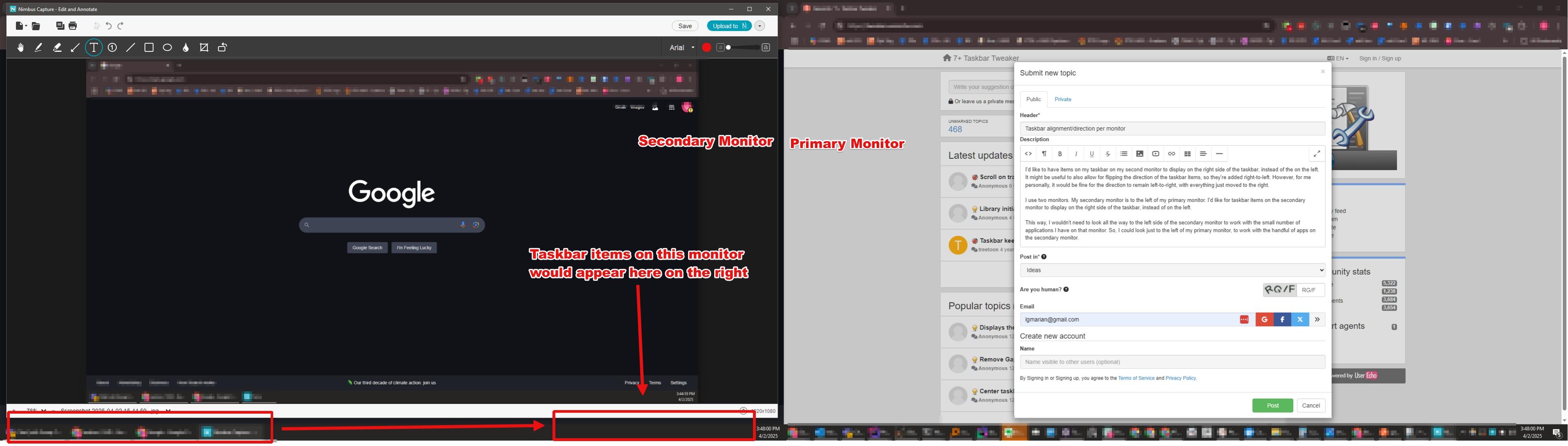
I'd like to have items on my taskbar on my second monitor to display on the right side of the taskbar, instead of the on the left. It might be useful to also allow for flipping the direction of the taskbar items, so they're added right-to-left. However, for me personally, it would be fine for the direction to remain left-to-right, with everything just moved to the right.
I use two monitors. My secondary monitor is to the left of my primary monitor. I'd like for taskbar items on the secondary monitor to display on the right side of the taskbar, instead of on the left.
This way, I wouldn't need to look all the way to the left side of the secondary monitor to work with the small number of applications I have on that monitor. So, I could look just to the left of my primary monitor, to work with the handful of apps on the secondary monitor.
Reclaim Startbutton space on second screen
The "Hide the Start button" option forgets to reclaim the Start button space on the second screen. So that space where the button was stays empty and can't be used by taskbar icons.
The one on the main monitor is removed and the icons can use that space, but the second monitor taskbar doesn't free up that space for icons.

Drag-Drop Onto Taskbar Icon for New Instance Not Working for Long Filename-Enabled Program
Hello, so an experimental build of VLC has long file path/file names (or more accurately, UNC -> "\\?\") enabled. 7+TT's feature of dropping a file onto the taskbar icon to "open with" is enabled, but is not working with this build of VLC (it works for other programs). I know that original VLC builds were fine. I can only imagine for now, that this is happening because 7+TT is does not have long filenames enabled. The actual filename's char count doesn't seem to matter, it's more like this build of VLC is prepending the character which is perhaps not playing with 7+TT (just my ignorant speculation). Would like to hear back and if it is the case, would love to have it enabled.
The “Open With” feature is a built-in feature of Windows, not a feature that the tweaker adds. You can activate it by holding the Shift button. All that the tweaker does is making Windows think that you’re holding the button.
خدمة دعم العملاء من خلال UserEcho


