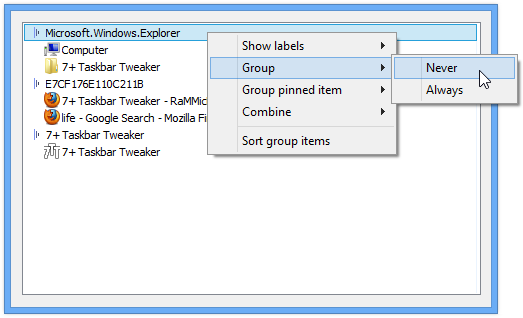
"Combine grouped buttons" doesn't work on Windows Server 2022 (7+TT version 5.15.1)
Windows Server 2022 uses the Windows 10 taskbar, and 7+TT version 5.15.1 works for everything except "Combine grouped buttons".
If I set Windows Taskbar Settings to "Never combine", then 7+TT can't combine them, using either the global setting or manually through Taskbar Inspector. OTOH, if I set Windows to "Always, hide labels", then "Don't combine grouped buttons" works to un-combine, as does using Taskbar Inspector manually.
I understand there probably aren't a lot of Server 2022 users, but the free Evaluation version has full features and can be used to test any issues.

Restarting the graphics driver breaks right click menu on second monitor taskbar
Whenever the graphics driver is restarted (e.g. when updating the driver or sometimes when my second monitor wallpaper bugs out and requires the driver to be restarted to restore it) the right click menu on the second monitor stops working.
I know it's minor and incredibly specific, but it has been annoying for forever.
Win10 22H2, nVidia graphics
 Hiding labels for Freeplane app will not work after restarting freeplane.
THis is because the application ID of freeplane is randomly generated everytime. It works initially, however restarting the freeplane app generated a new application ID, meaning after a restart the settings like hide label, combine etc will not work.

Advanced Hover/Peek
Hi Michael,
I can't find anywhere to accomplish this request, and wonder if it is something you could incorporate into Taskbar Tweaker, or if it already exists point in the right direction to find it.
My problem is that I like thumbnail previews on the taskbar, so I don't want to set the Hover option to "nothing", but I don't care for the full-screen peek when you hover over the thumbnail. I understand that I can just not hover over the thumbnail until I am ready to click to avoid the problem, but I have legit diagnosed and medicated ADHD and it's that kind of minor inhibition that I have a very hard time controlling... thumbnails pop up and before I can stop myself I am hovering over one without even reviewing the group, and then that maximizes too fast for me to have scanned the other thumbnails in the group. Even worse, if it *is* the tab I want my default inclination is to move the mouse over the preview to where I want to cursor in the app in question, which causes the preview to disappear and I have to do the whole thing again.
This may be a minority use case, but this does seems to be the kind of thing that a user should be able to choose.
Either turning of the full-screen preview, or even being able to delay it by 5 seconds would be tremendously helpful for my productivity *and* may sanity :)
Thanks in advance for your consideration!
-Bill
Icon padding in system tray seem buggy
Hi. Not sure if it's this installation that's mongoloid or if it's actually a bug due to the latest Windows Update.
Can't quite point my finger to any update in particular, but it's one of the latest H2-something which is all I remember, then some supplementary update to that, then a computer that wouldn't behave normally, followed by 4 times reverts to restore points, with the last resulting in a boot-loop and unable to restore (When Bitlocker is enabled, the recover boot partition is disabled in the process, apparently), so I had to install Windows on another drive, and after installing tons of stuff, it was 7+'s time to shine, but it didn't like it used to. I set all my defaults for the apps behavior and appearance, but I noticed that icons were missing.
I always disable that disgusting no-labels and grouping crap that MS enforced upon us, and I also have twice the hight of the taskbar to accomodate lots of apps, shortcuts and icons, but half the icons were missing.
I'm not sure, but I think I saw something like this during the restore point-stuff. Can't say that it actually was this, as I was focusing on getting stuff working again...
Anywhoo, I resized the taskbar and upon dragging it upwards, some icons came back,
Did this a few times, also dragged the menu to other monitors (3 screens) but no effect.
First when I thought to try changing the padding size, I tried changing between 1-8 and no effect other than either humongous space, or none at all.
When, however, I set it to 0 all icons came back, and now I can't use this feature without losing some...
Annoying to say the least. Some because the feature isn't working, but mostly that MS is forcing us to have big clunky crap with half the info missing/hidden - A line of thinking I'll never understand.
A bug with sticky note
After installing this program, when I click the shortcut of Windows Sticky Note, the shortcut automatically moves to the right end of the taskbar.
I've found this issue long ago with v5.12.3, and today I tried with the new version 5.15.0.0 but this still happens.

I checked it, and the following happens:
It starts with Notes pinned:
[icons...] [Notes-pinned] [icons...]
When you click on it, a new window is created, which replaces the pinned item:
[icons...] [Notes-window-1] [icons...]
Then, for some reason Notes creates a second window:
[icons...] [Notes-window-1] [icons...] [Notes-window-2]
Note that because grouping is disabled, the second window is created at the end of the taskbar.
Finally, the first window is closed:
[icons...] [icons...] [Notes-window-2]
It's a problem with Notes, and you have the following workarounds you can use:
- Enable the "When not grouping, place new items next to the existing ones" option. That will affect all programs.
- Enable grouping for Notes in Taskbar Inspector.

Double-click on the arrow of hidden tray icons
Greetings Michael, using your masterpiece, I noticed one annoying thing. Some programs (like PCRadio) do not create a permanent icon in the tray - when you open them, the icon disappears from the tray and the arrow of the hidden tray icons is automatically pressed, which you have to manually close (the menu of hidden icons opens with a single mouse click). Is it possible to introduce the option of double-clicking on this tray arrow into the list of hidden settings of 7+Taskbar Tweaker? So that it does not open accidentally from a single touch. For example, 0 - is a single mouse click to open icons hidden in the tray, 1 - is a double click.
Otherwise, everything about the 7+Taskbar Tweaker is fine - except for the lack of this feature. And with the incoming...Happy New Year)


emptyspace|lclick on secondary display requires double click
I use emptyspace|lclick to open the taskbar and I love it, however on my secondary display it actually requires a double click to work.
I understand this is normal behavior when taskbars are unlocked, but in the case of a secondary monitor it happens even when all taskbars are locked.
If a fix is possible it would be appreciated, and thank you very much for this software (:
Edit/Remove Items In The TaskBar Right-Click Context Menu
Just as the title says. Is it possible to edit/remove some items from the right-click context menu of the TaskBar at all?
For example, I right-click on the TaskBar and have it not list the items:
• Search
• Show People on the taskbar
• News and interests
etc...

Sort settings not staying after reboot
I keep all menu items sorted alphabetically but it won't stay that way after a restart. Also any hidden items reappear. So whenever I need to restart Windows I need to go through and re-hide hidden items and re-sort all menus. Is this a bug, or am I missing a setting somewhere?
Windows 8.1
Asiakastuen palvelu UserEcho