
 Remove extra gap between items not working on secondary screen
Hi, I have version 5.13.
In the Pinned items category I select the "Remove extra gap between items" and on main screen I see the change, but this action does not not happen on my secondary monitor.
I am not sure if its a bug but I would like to have this included in the program also.
Regards

 Closing the app
When I close the interface, the app minimizes to the systray instead of shutting down. There is no setting to prevent this.
Please add these feature https://github.com/benbuck/rbtray
Please add these feature https://github.com/benbuck/rbtray

It doesn't Show Label when Decombines
I enabled the Decombine feature On Mouse Hover And Show Labels, and now I want to disable the Show Label per app (like I did in Facebook). But I don't want to set it to Never, I just want to uncheck the Always, like I want to set it to default.
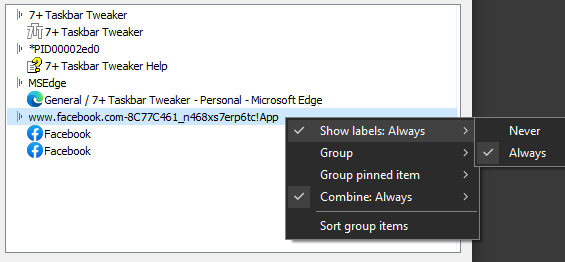
I don't want to show the labels on the taskbar all the time. So if I hide the labels per app (set it to Never), then if I put the mouse over the grouped thumbnail, it decombines but it doesn't show the labels.
But if I set it to Always, well it shows the labels but I don't want to show the labels on the taskbar all the time.



You can use the “-hidewnd” command line option. It should be added automatically if you choose to start the tweaker on startup when installing. Perhaps you configured it manually.

Drag to re-order pinned items (jumplist)
In Win7 you could re-order the pinned items (ie. jumplists), but this was removed in Win10.
Atm the only way to re-order pinned items is to unpin every item for a given program, then re-add them manually in the desired order.
Would it be possible to add the re-ordering feature back in?
Thank you for the feedback. This was suggested before:
https://tweaker.userecho.com/topics/753-rearrange-jump-list
Closing as a duplicate.
restart program have the same sequence of windows?
hi
first i want to thank your for a great program. love it.
i would even more so if it would remember the sequence of all the windows after restarting a program or rebooting windows 10.
is that possible?
thanks again
Currently it's not possible.
See the following topics:
- https://tweaker.userecho.com/topics/99-group-id-memory
- https://tweaker.userecho.com/topics/110-order-lost-when-updating
- https://tweaker.userecho.com/topics/165-remember-explorerfolder-order
Closing as a duplicate.

Could not load library (5)
I occasionally get this error and have to close and re-open 7+ Taskbar Tweaker for it to load properly. Not a dealbreaker by any means, just an occasional nuisance.
I'm using a portable install with a shortcut in %appdata%\Microsoft\Windows\Start Menu\Programs\Startup to get 7+ Taskbar Tweaker to run at startup.

Under "Hovering", "List" doesn't work
Under "Hovering", when I choose "List", it shows a tooltip, not a list. It used to work a few months ago. I tried uninstalling and reinstalling, doesn't work anymore. BTW, I love your product!

Double Click On Empty Space (Win 11) (Dual Monitor)
In Windows 10, when I double-click on empty space, it was going to the desktop just on the impacted monitor and it was good. However, in Windows 11 (ExplorerPatcher) when I do it, it goes to the desktop on both monitors. Could you please fix it?
Customer support service by UserEcho


