
 Task bar icons fail to ACTIVELY detect which monitor they belong to.
Issue in media form:
Workaround: Restart '7t' -> The task bar icons will move to the correct monitor's task bar.
Solution: Have '7t' periodically check if the task bar icon is on the correct task bar, depending on what monitor the task bar icon's corresponding application window is visible on.

Closing as this is probably not caused by the tweaker. If you have a reason to think otherwise, please leave a comment.

 Using the portable version on a different PC
Hi Michael,
I was trying my portable version on a different PC, and I found some changes from my regular experience.
1. I think in my PC I set the Preview Thumbnail to appear more fast by Registry editing. I think this option not supprted yet by 7TT.
2. I think the 7TT menu needs a little improvement. Consider change the 7TT menu as follows:
Make "Show Labels" as a new independent option (consider a new class).
Move the "Decombine:" options, and make them as a sub options of "Combine grouped buttons".
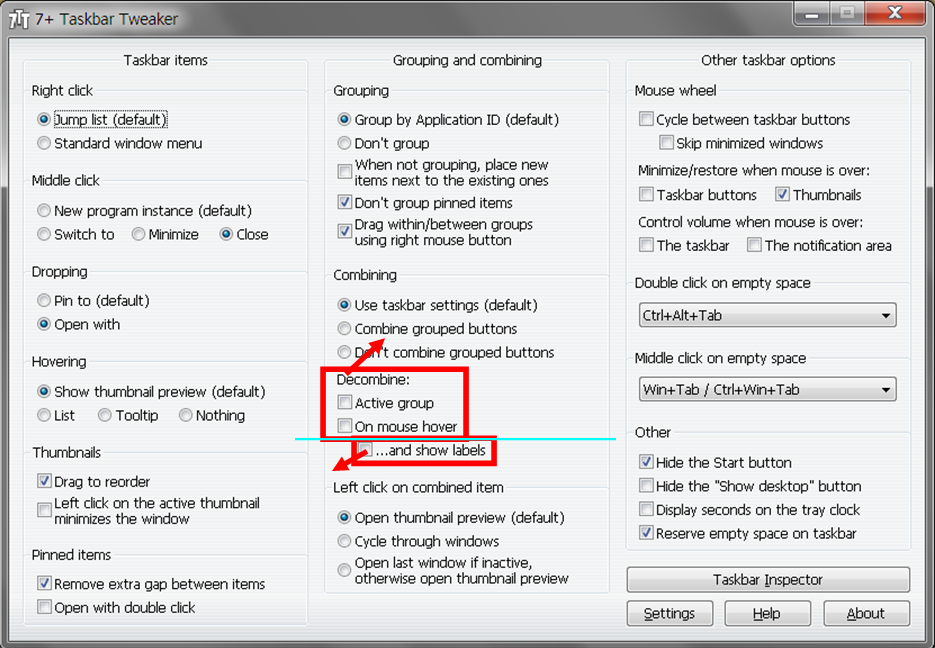
3. "Don't group pinned items" feature needs also an improvement, to avoid having the pinned items located between groups and making a mess when launching 7TT (while apps are running). It needs to rearrange automatically the pinned icons to their natural one place, by the start button.
Hi,
1. Yes, it's not supported.
2.
Make "Show Labels" as a new independent option (consider a new class).
I haven't done that because it can be controlled from the taskbar properties. I understand why it can be desirable for a portable version, but currently, it's not possible.
Move the "Decombine:" options, and make them as a sub options of "Combine grouped buttons".
The "Decombine:" options can affect items even if "Combine grouped buttons" is not selected - if you configure some AppIds to combine with Task Inspector, therefore they are not subitems.
3. The current behavior is logical if you choose "When not grouping, place new items next to the existing ones". I understand the motivation for the suggestion, but currently, it's not supported as well.
All in all, I'll keep the suggestions in mind, but they probably won't be implemented in the near future.

Ошибка explorer.exe
7+ Taskbar Tweaker 5.2.1 Portable, Win 7 x64 SP1.
Бывает, при завершении работы или перезагрузке выскакивает окно с ошибкой explorer.exe - "Приложение обратилось по адресу ххххх. Память не может быть read".
Возможно ли исправить эту ошибку?
В целом программа великолепна. Спасибо.

Previewed windows hide grouped thumbnails while browing them
Hello
For some reason after a recent update the program started to behave different while previewing the windows of grouped thumbnails. Hovering or clicking over the taskbar icon shows the thumbnails ans before, but now hover over the thumbnails previews their windows *on top* of the thumbnails and not behind them. This, of course, occludes the thumbnails and prevents informed browsing of the different windows of an application. When there any many of them (as is typical with a web browser, for example), this becomes annoying.
Many thanks for a really fantastic tool!

Middle click on Windows 10 App doesn't work (again)
I see just old threads and the same problem with metro apps which was fixed two years ago but we have it again. It works on regular programs but with windows app (like calculator) it does nothing. Looks like "close" action really works as "show".
I'm using MMB to close but all other options don't work as well (besides Windows default).
Windows 10 Pro (1607), TT 5.2.1
Left click on the Explorer bar often doesn't work and expand thumbnails
I have about 20 opened windows and my explorer windows are stacked. When I click Explorer bar to expand thumbnails, it doesn't always work. Sometimes I have to click trice! When I quit 7+TT, problem is gone.

Taskbar transparency depending on maximized windows
There should be an option to remove the taskbar's background entirely (or by some percentage) when there's no window maximized.

Can't click on client monitors when using Synergy
I run a Windows 10 Desktop (10.0.14393) and a Windows 10 Laptop (10.0.10586), using Synergy to use my desktop's mouse and keyboard on my laptop for ease of use. Both machines have 7+TT installed.
While 7+TT is running on my desktop, click events through Synergy onto the laptop screen don't register at all, although keystrokes, mouse movement and hover events still go through. If I disable 7+TT on my desktop PC, the issue goes away, but then I don't get any of the nice features of 7+TT on my desktop.
My theory would be that the process to interrupt click events on the taskbar is preventing click events being passed to Synergy or through the program at all, perhaps only when the mouse is "off the screen" on another connected PC's screen? If it is in fact a problem with Synergy and not 7+TT, I'll take it to their bug tracker instead. :)

Add some toggle switch widget on taskbar, to turn (e.g.) bluetooth on and off
It'd be great if there could be some toggle switch on taskbar to enable/disable Bluetooth (mostly for headsets, connect/disconnect of certain headphone would be awesome too, sorry for being so pushy :-D).
This is my specific need, but I suppose many other switches can be offered, like a little drag-scroller to change brightness, etc...

A Bug?
I run 7TT v5.2.1 on W7x64 Home Premium. When Auto-Hide the taskbar is turned on, Maximaze or Vertical Stretch will not redisplay the taskbar from any window. When I exit 7TT, W7 will redisplay the taskbar under the same conditions [1]. I think 7TT should fix this.
[1] The exception to this for W7 is with IE11 in F11 full screen mode, in which neither 7TT nor W7 will redisplay from Auto-Hide.
Klientų aptarnavimo paslaugos teikia UserEcho


