
 Bug/infelicity: when set to auto-hide, the taskbar does not always pop up when overlaid by certain windows
The bug is intermittent and seeming affects (but, since it is intermittent, does not always affect) certain applications. Common offenders on my system seem to be Word 2013 and, to a lesser extent, Firefox.
Combine grouped buttons doesn't combine v5.2.9.2

That should be fixed in v5.2.9.3, among other things. Please try it.

 taskbar tweaker не удалось загрузить библиотеку 104
сегодня обновил винду через центр обновлений и 7+ выдет такую ошибку - taskbar tweaker не удалось загрузить библиотеку 104
could not load library(104) on Windows Creative update build(1703)
And I was unable to "inject" the inject.dll, even I tried to reinstall.
middle click only works in the lower half of task bar
Hi
Middle click on task bar button to close window only works if clicked in the lower half of the button.Upper half: taskbar "blinks" but no result. Win7.
-Same for NEW INSTANCE
-Same for task bar on top
-No issues if task bar left/vertical
But: Great tool!
Add Aero Peek box on multi-monitor taskbars
Having the Aero Peek button/area at the right corner of each monitor's taskbar in Windows 10 would be extremely useful and appreciated!
Currently, Microsoft only shows on the primary display, and that can be very frustrating with dual monitors.

(Windows bug) Toolbar makes taskbar to change height
This is a very old problem that microsoft didn't fixed yet.
Since windows 7 i have used a toolbar with "ThisPC", that is super useful, for example when you plug a usb, etc.
The problem is that if you set the icon size of the toolbar to big, that makes the whole taskbar taller, and the app buttons get a space at the bottom, that makes the buttons hard to click.
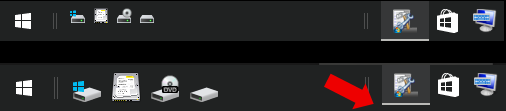
It would be great if you could fix it, it could be as simple as changing the height of the toolbar buttons.
Here is a post of a guy talking about that: https://answers.microsoft.com/en-us/windows/forum/windows_10-start/taskbar-changes-height-when-toolbars-have-icons/d180b0a8-000c-4921-89b1-862df0d5f92c
And this will also fix the second request of this: http://tweaker.userecho.com/topics/476-multiple-system-trays-a-few-other-request/
I'd like to congratulate you for this great app, thanks.
New instance (of explorer) with same content/file (folder path)
I'm using the 'New instance' (default: middle mouse click) feature A LOT !
I recogniced that often when opening on that way a new explorer, I go somewhere close to where the "father's" explorer's path was.
So I concluded that it would be very useful to have an (additionally) way to open a new Instance with the father's content. Well, 'content'is probably too general and unprecise/different from app to app! But each appliciation with a specific file or folder opened should be able to deliver this to the new instance (extra Hotkey for example).
So a notepad or vim, which starts with the same file opened, could be quite useful in fact.
The maybe most flexibel way would be to let the user decide on his own which command line should be delivered to the new instane. With the speciality to have the file/folder path as a variable available.
Best greetings,
Clemens
P.S. thanks for that high qualitiy plus useful software you produce(d) for you and the rest of the world!!
Clicking stacked explorer windows button makes thumbnails pop up, blink, and disappear momentarily
Windows 7 x64.
After some long time at working machine, after several sleep/wakes, I guess, 7+TT fails to keep thumbnails of stacked explorer windows stay after click, the almost immediately gone. Sometimes clicking does nothing. And only after several clicks they finally stay. Switching 7+TT off fixes problem.
Here's animation recorded: http://dropmefiles.com/deY0J
Since it's not a bug of 7+ Taskbar Tweaker, I'm closing this issue. Let me know if you find out that it's something to do with the tweaker.
Customer support service by UserEcho


