
 Аrrangement of new items next near existing stopped working when grouping was disabled.
Hello! Sorry for my english :)
On the new Windows 10 v2004 stopped working arrangement of new items next near existing stopped working when grouping was disabled. Even in beta version of TasbarTweaker.
New items appear at the end of the list of pinned items list in tasbar (even "dont group pinned item" option is disabled).
No other Windows customizers are installed. How can I fix it?
Thanks!

Please try the newly released beta version, 5.8.0.5. I believe it should be fixed.

 Ability to remove system tray tooltips
Add ability to turn off system tray tooltips when hovering over system tray icons

Explorer.exe crashes when the taskbar is set to autohide.
OS: Microsoft Windows 10 Home Single Language 64-bit
Kernel: 10.0.19041 (20H1, RTM)
7TT version: 5.8.0.4 Beta (activated)
Steps to reproduce:
- Open 7TT.
- Open Windows Settings.
- Go to Personalization->Taskbar.
- Click on "Automatically hide the taskbar in Desktop Mode"
- Windows' Explorer.exe crashes and reloads.
Please try the newly released beta version, 5.8.0.5, I believe it should be fixed. Let me know whether you still see the problem.

"Place new items next to the existing ones" creates issue when using FalconX (for centering icons in the Taskbar)
There was this request https://tweaker.userecho.com/communities/1/topics/285-center-taskbar-icons
And there is another application that can do this already -
https://chrisandriessen.nl/web/FalconX.html
However when used with 7+TT and with "Place new items next to the existing ones" enabled, it forces the taskbar icons to slide back to the left for a moment. And not always - ONLY when 7+TT fixes the position, which means cases where you open a new window of existing opened application and its icon is not the right-most at the taskbar. Otherwise the issue does not happen.
Or, of course, a proper implementation of this feature in 7+TT itself would make FalconX obsolete and there will be no need to fix this.
Ability to change Start Menu icon
The start button icon (right at the left of the taskbar) is an abstract picture of a little white window.
I want to change it to a custom picture.
It would be great if your tool would allow that.

Add an "always last" option to taskbar items (index would be even better!)
There should be an option where you can set some application (A) to be "always last".
So when a new application/window (B) opens in the taskbar it will still be before A.
But a bool (ye no) is not enough actually because I have 3 applications I want this for, so an index would be better.
Lets say all applications have index 0 by default.
And then the user can give positive or negative numbers to specific entries in the taskbar-inspector.
Anything that has a negative value goes first (more negative = sorted even further left/first)
and everything that has a number greater than 0 will always be sorted after the default stuff.
Also, thanks for your great work man!
edit: I found this:
https://tweaker.userecho.com/communities/1/topics/719-user-defined-order-of-placement-on-taskbar
which seems to be more or less the same, but the request is really old :(

Tray icon spacing issues with v5.6.2.3 beta after Windows 10 1903 update
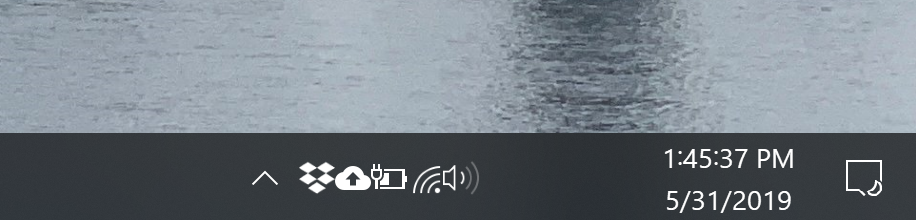
This happens very frequently and then will be fixed with some clicking around, only to happen again a few minutes later. I've set the tray icons padding to a good value in 'advanced settings' dialog and it looks good when working normally, but then this bug will happen.

Asiakastuen palvelu UserEcho


