
 Add Change Log Button/Link
Hi,
I just updated the program, and saw a button for change log before I pressed update. However I updated it first, as I assumed I would easily be able to access the change log afterward. However the only link I see in about is this page for bug/features tracker.
Can you not make a link in the About button just for the change log?
I always like to see what features and bugs have been added/dealt with with every update, even after I've pressed the update button.
Just a suggestion, keep up the good work! :thumbs up:
Regards,
Manny

GROUP BY APPLICATION ID DOES NOT WORK WHEN MOVING GROUP
Only one of the items of a group moves

Closing due to a lack of feedback. Feel free to leave a comment if there's still a problem.
Allow us to minimize/restore things in the notification area
Allow us to minimize/restore things in the notification area the same way we can minimize/restore programs when mouse is over taskbar buttons/thumbnails
Besides being an awesome feature in general, it would make for a consistent behavior across the whole taskbar. The moment I found about this feature I knew there wasn't going back - it would be so nice to have it in the notification area too.
Thank you very much for your consideration
There's no minimize/restore in the notification area. The notification area contains buttons that applications can create, and these buttons can react to events such as left/middle/right/double mouse click. Several apps hide/show/minimize/restore their window in response to some of the events, so it looks similar to the taskbar buttons, but it's just a coincidence, and is not consistent across apps.
If you want to re-map the whell scrolling event over your notification area to be treated as a left mouse click, for example, you can use a nifty tool called X-Mouse Button Control.
 Hide Tray Icon No Longer Works
In version 5.6, the option to "Hide Tray Icon" no longer works. Tray Icon is visible whether the option is checked or not.
Closing due to a lack of feedback. Feel free to leave a comment if there's still a problem.
Volume change window is black when no sound device is connected
I disabled the internal speakers of my Laptop, but still use the 7+TT volume controls when I plug in my headphones.
However, when the headphones are not connected and I accidentally scroll on the taskbar a mostly black window is shown, somewhat larger than the normal volume slider window. While this is not a huge issue, it does not look like something that is supposed to happen.
Error: Could not load library (5) in 1905 version of Windows10
works fine in 1903 but doesn't work in the latest update
I assume that 7+ Taskbar Tweaker v5.7 fixes that. If not, please leave a comment.

Failed to close the program in the taskbar
Make this setting for 7+ Taskbar Tweaker
http://get.wiz.cn/wiznote-windows-x86-2019-04-27.exe
Please download this program and install it
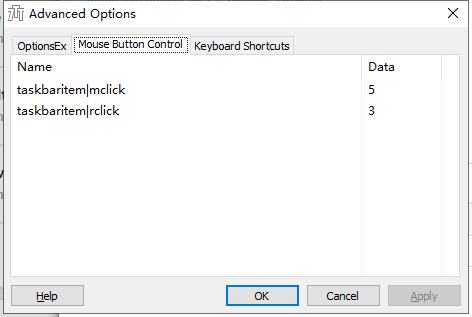
Run the program and minimize it to the taskbar,Then click the right mouse button,The program has not been
Closing due to a lack of feedback. Feel free to leave a comment if there's still a problem.
Move taskbar items between monitors
it would be nice to move taskbar items between monitors with the app windows following it, because it's pretty easy to sort apps between screens without finding the window on the screen and trying to catch it and then drag.
Would be a nice feauture.

Volume control with mouse wheel does nothing if sound is muted
Wehn I use the mousewheel over the notification area to change the volume nothing happens if the volume is currently muted. While that may be intentional I would find it more intuitive if the volume is automatically unmuted (maybe after turning the mouse wheel quite a bit?), at least when scrolling "upwards".

Feature Request: Copy the contents of the taskbar Inspector to the clipboard
I have been trying for years to find a program that will copy the names of all my open programs and files so I can make a notepad file to use to re-open everything. This would do exactly what I want BUT there is no COPY command on the menu.
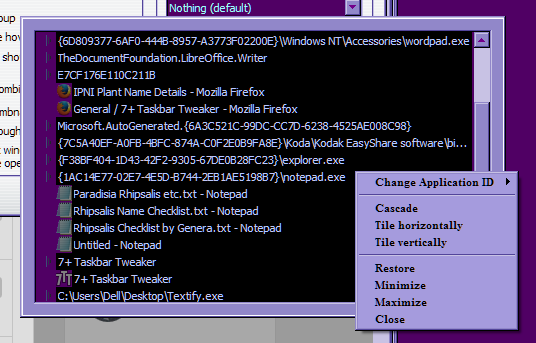
I have some serious disability issues with my vision and handwriting, so it is very slow and difficult for me to hand write the names of all of the open stuff every time I have to turn my computer off because of an update or whatever reason. I don't know to much about programming.
Thank you, KK.
Customer support service by UserEcho


