
 Grouping - how to reach thumbnails when selected "open last window if inactive"
Is there a good way to reach the group thumbnails when "open last window if inactive" is selected ?
Can we have hover display the thumbnails in this case ?
Thanks!

 could not load library (209)
hi! start program(adm. rights) with error - could not load library (209)
program work only after logout user and again login.
after restart windows again error 209
windows 8.1 64 last build
7+ tweaker last build and beta

 Auto Display USB Drives and Removable Disk types in Explorer
In Win7, add an option that when a removable disk type is attached to the system, automatically display the drive in Explorer and suppress/close the default windows AutoPlay popup.
This is not meant to auto run anything from the Removable Media, just display the directory contents from the root in Explorer without having to interact with the AutoPlay dialog. Win7 does not support any automatically-do-anything within AutoPlay for Removable Media, which was done to prevent autorunning of malicious code and viruses on a device, but automatically displaying directory contents in Windows Explorer, the only forced prompt the official Win7 dialog allows, does not autorun any files from the media and doesn't create additional virus risks.
Please overlook whether this is strictly a taskbar responsibility or not, it would be a great convenience feature with the few API handlers for 7+ Taskbar Tweaker to be notified by the system when removable media is attached, and handle the event. Thanks!
always show label explorer not working windows 10
windows 10 1703 + taskbar tweak 5.3.0.4 beta
taskbar set to "always, hide labels" + taskbar tweak set to show labels always = explorer showing only folder icons, not labels, the rest of pinned itens are ok
taskbar set to "combine only when full" + taskbar tweak set to hide labels from all other pinned apps = working
can you check this?
btw thanks for this amazing app i've been using for years now, i had to update do win 10 and now i got this small problem

I've checked it. What happens is that StartIsBack++ completely re-implements the function that is responsible for drawing the taskbar buttons, CTaskBtnGroup::Render. Therefore, the changes that the tweaker does don't apply.
7+ Taskbar Tweaker can't do much about it. A possible solution would be for StartIsBack++ to provide an option for the users to keep using the original rendering functions (and maybe limiting the functionality as a result).

Multi-Taskbar functionality?
So I got two monitors now and I'm using DisplayFusion to get two taskbars working on each of them. But the 7+TT doesn't transfer the advanced options I set, so it only works on one, like the icons padding and the Show Desktop's button removal as you can see on the screenshot below.
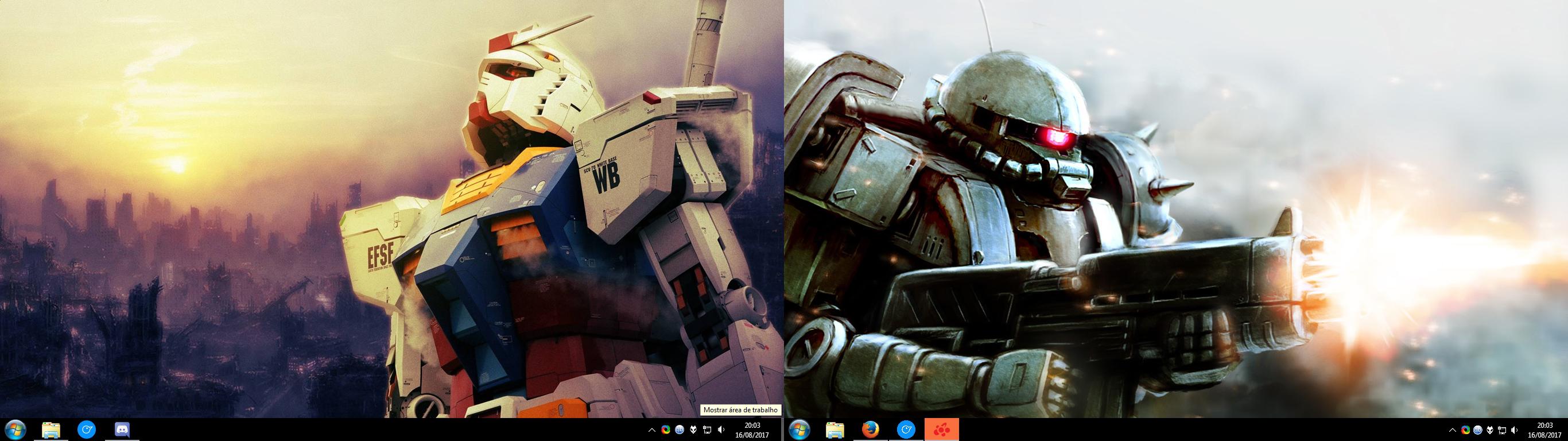
("Mostrar área de trabalho" means "Show desktop" in portuguese)
So this is my problem. Is there a workaround this or do I just deal with it?
7+ Taskbar Tweaker does not, and probably will never support third party taskbar implementations. See the discussion here:
http://rammichael.com/7-taskbar-tweaker/comment-page-14#comment-2835
Note that starting with Windows 8, there is native multi-taskbar support in Windows, which is supported by the tweaker.

desktop icons move on startup
i have 2 1280x1024 screens side by side. I have the taskbar on the left of the left screen and set to the skinny width of one small icon (no_width_limit=1). On startup, the taskbar is 2 small icons wide, then my first column of icons on the left of the desktop get moved to the first column on the left of the right screen. then the task bar shrinks to its minimum 1 small icon width, but of course my desktop icons have still been moved and i have to move them back. Is there an option that stops this or can it be fixed?
I'm not sure that I understand the issue from your description. It would be best if you could provide a video, or at least some screenshots.
my first column of icons on the left of the desktop get moved to the first column on the left of the right screen
Do the icons move to another monitor? That's usually means that the relevant windows move to that monitor as well. Does that happen?
In general, because the tweaker starts after the taskbar is already created, if the no_width_limit option is used, the tweaker shrinks the taskbar. Perhaps that has some side effect.
By the way, how come that you have open windows on startup? Usually, no applications are open upon Windows startup.

no_width_limit - fully remove minimum width limit (classic theme)
Even with no_width_limit=1 vertical taskbar is significantly wider (almost 2 small icons) than in Windows XP with minimum width.
It would be ideal:
- no_width_limit=2 - minimum width as in Windows XP (1 small icon) (minutes of clock would be cutted - it's normal, I use program tclocklite);
- no_width_limit=3 - no any minimum width (for example, allow 1/2 of small icon width).

task bar buttons move after "swtiching user"
Can somebody comment on what happens to task bar buttons when coming back after "Swtich User"? Mine move, in somewhat random ways. It would be great if they stayed in the same place I left them.

Asiakastuen palvelu UserEcho


