
 Could not load library (208)
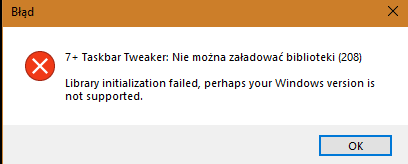
Hello, my problem is that when i update my graphic card or when i plug my hdmi (pc to tv) i got this error and my windows taskbar dissapears. I have to restart/logout, i tried to reopen windows explorer but it doesnt work, only pc reset or logout works. This problem occured on normal and beta version of 7taskbar. Sorry for my bad english in advance.

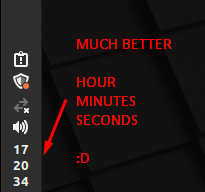
 Vertical clock like Linux Mint
Hi,
Currently, my clock looks like this on Windows 10:
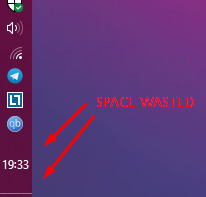
It is possible to make the clock look like this (Linux Mint)?
Keep Taskbar calendar open until it's clicked on again.
The taskbar calendar is handy, but not so handy if you need it to stay open while referencing it.
Can you create a setting to cause it to stay open once it's clicked until it's clicked again?


Startup bug
I am running Windows 10 Version 2004 OS Build 19041.630
At Startup I get the error:
---------------------------
Error
---------------------------
7+ Taskbar Tweaker: Could not load library (107)
Library initialization failed, perhaps your Windows version is not supported.
---------------------------
OK
---------------------------

Please update 7+ Taskbar Tweaker to the latest version, 5.10. That should fix the problem. Let me know if it doesn't.
Ctrl+Left Mouse Button - > Close App ?
Can you make an option to close running programs with Ctrl+Left Mouse Button
Good to know you found a fix.
Thanks for sharing the solution, perhaps it will be helpful for other users.

 Second monitor minimize taskbar size
Hello,
I would like taskbar tweaker to set the taskbar size to whatever I set it to last time on my second monitor also. As it is now if I make the taskbar smaller on my secondary display it returns to the default size when restarting my computer. Is this possible with an option I have not found yet?
Downloading Taskbar Tweaker 5.9.1. keeps on failing
Tried a couple of times from this page, keeps on failing.

Fehlermeldung: taskbartweaker konnte die programmbibliothek nicht laden(5)
hi bekomme diese Fehlermeldung:
taskbartweaker konnte die programmbibliothek nicht laden(5), kann mir jemand helfen?

Save location of pinned items and force restore if they move
I'd like the ability, perhaps in the taskbar inspector, to lock/save pinned (and unpinned?) items' locations so if they move, they'll be automatically moved back. For example, every now and then, a browser ends up jumping from the far-left to the far-right, and every time I run Steam's big picture mode, when I exit it, Steam has moved to the far right. If I could mark specific pinned programs that I always want to be in the same place so 7++ will take note of their position and put them back there if they're ever moved, that would make W10 just a little less frustrating to deal with.
Customer support service by UserEcho


