Feature - W10 + Outlook 2013 Desktop Alerts

 drag within groups no longer works

You're saying that the issue was introduced in v4.5.4, but the behavior exists at least since v4.5.

Open Task View with middle-click on taskbar [Windows 10]
My dream is to have a symmetrical 7-button open standard mouse (no weirdo drivers) where button 6 or 7 opens Windows 10's new Task View :)
In reality I figured it would be nice to open Task View from double-clicking an empty space on the taskbar.
Option to exclude some applications from combining and forcing others to combine
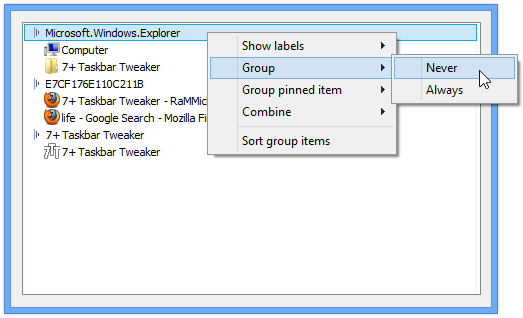
I would like to be able to exclude some applications from ever combining their window icons even when the taskbar is crowded. I would also like to be able to force other applications to always combine their windows even with plenty of space on the taskbar. I'd like to do this while still allowing the rest of the applications to combine/decombine based on taskbar width.
Basically, on an app by app basis, I'd like to be able to click on the app in the 7TT settings and select from "never combine, always combine, auto"
http://rammichael.com/wp-content/uploads/2009/09/Taskbar-Inspector.png
Having said that, it sounds like you're using the "Combine when taskbar is full" taskbar configuration. The tweaker doesn't support controlling which buttons to combine when this configuration is chosen. There's an open ticket for that, you might want to vote for it to express your interest:
http://tweaker.userecho.com/topic/179603-decombining-options-dont-work-as-expected-with-the-combine-when-taskbar-is-full-configuration/
fully portable version?
A "fully" portable version is available, read the FAQ for more info:
Volume control time from time work or don`t work with start windows 10x64
Volume control time from time work or don`t work with start windows 10x64
Probably fixed in v5.1. If it's still an issue, please let me know.

Bug: Drag&Drop doesn't work on 2nd taskbar
Program version: latest (4.5.1)
The problem: When in program settings I set "Dropping" to "Open with" and when I drag any file from Windows Explorer to taskbar button with a program I get cursor "Unavailable". And a window of program, on which I hold cursor, doesn't activate.
This problem exists only on 2nd taskbar on my second screen (I have 2 screens)
w7 64 bit crashing very often!
here are a list of my files...
7+ Taskbar Tweaker.exe.5760 .dmp 682,622 .a.. 2014-07-10 16:11:22
7+ Taskbar Tweaker.exe.3004 .dmp 726,117 .a.. 2014-07-09 21:16:54
7+ Taskbar Tweaker.exe.1676 .dmp 803,838 .a.. 2014-07-07 5:47:31
7+ Taskbar Tweaker.exe.4864 .dmp 771,829 .a.. 2014-07-05 14:05:44
7+ Taskbar Tweaker .exe 345,088 .a.. 2014-06-27 14:41:24
7+ Taskbar Tweaker.exe.5256 .dmp 793,897 .a.. 2014-06-24 8:59:17
7+ Taskbar Tweaker.exe.860 .dmp 838,142 .a.. 2014-06-16 8:37:18
7+ Taskbar Tweaker.exe.5300 .dmp 757,261 .a.. 2014-06-11 22:13:32
7+ Taskbar Tweaker.exe.5172 .dmp 768,833 .a.. 2014-06-09 8:45:39
7+ Taskbar Tweaker.exe.5312 .dmp 693,318 .a.. 2014-05-29 11:39:18
7+ Taskbar Tweaker .lnk 1,953 .a.. 2013-01-19 2:27:00
you can see now that it is crashing a nearly every 2 days. Before the end of May it used to be very stable. Never a problem.
http://tweaker.userecho.com/topic/382920-after-wak...
Unfortunately, I cannot reproduce this bug. All I know is that it's caused by the autoupdate checker, and by looking at the reports you can conclude that the bug occurs only on Windows 7. Perhaps it's a bug of Windows, I don't know.

Drag sometimes causes whole window to flash when vertical scrollbar
Sometimes (!), when there are enough windows that 7tt has a vertical scrollbar, dragging items results in the entire 7tt window flashing for each step of motion in the list. This is consistent, until some windows are either opened or closed. Then the behavior usually goes away. Unfortunately, I have not been able to figure out whether there is any particular window type that causes this to happen, or the exact circumstances under which it happens or goes away. All I can tell you with pretty good confidence is that it usually occurs the *first time* I try to use 7tt once it will need a scrollbar.
Recall that for my configuration, 7tt uses a window that must be dismissed.
not grouping bug
Expected behaviour: the pinned item to not be visible, as there is an instance open.
Current fix: enable/disable again the grouping.
I'm closing it as a duplicate of:
http://tweaker.userecho.com/topic/314270-icon-of-closed-window-blocking-active-window-to-take-its-spot-in-the-taskbar/
Customer support service by UserEcho