
 Sort buttons in groups by "Active" recency (+options)
Hi!
Please add a setting to sort buttons by last accessed order.
Also it will fit ~all of users, when having tweaks:
- Wait for N seconds to treat window as Active
- Reverse order
- Also sort windows out of groups
Thank you!
as a side note: Interestingly, when explorer.exe is terminated and relaunched, it sorts windows inside groups just right (save for "wait N seconds" and order is reversed to what i need)

Ability to change the volume increment to +/-1 instead of +/-2
Presently, the volume adjusts in increments of 2. It would be good to have an Advanced Option to change the volume increment to 1.

Thanks for the suggestion. Such a topic already exists:
https://tweaker.userecho.com/topics/1017-option-to-change-volume-step
Closing this as a duplicate.

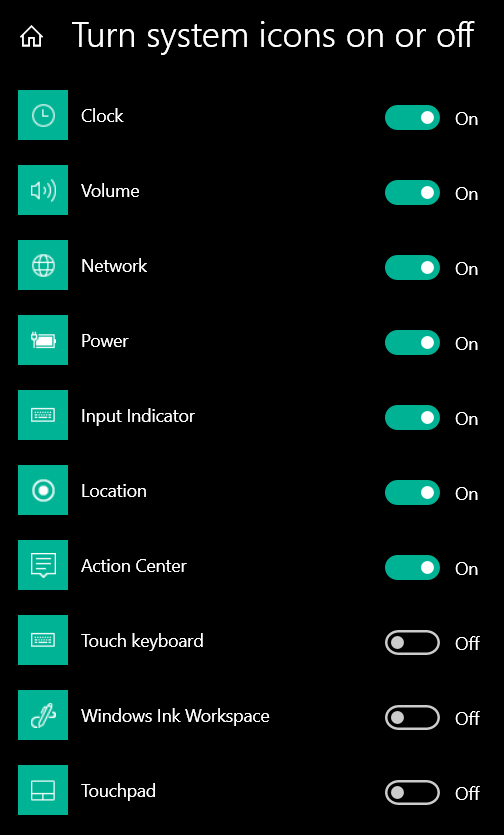
Show/Hide buttons and system icons, using action mapping
I would like the custom keyboard/mouse mappings to be able to toggle the "Hide Start/Desktop button" options.
Ideally it would also be great to be able to use mappings to toggle the display of system icons as well:

 Prevent Win+# from minimizing focused applications
I'm looking to prevent applications from being minimized by the Win+# hotkeys while they are focused.
Basically the keyboard equivalent of your awesome taskbaritem|lclick = 1 change.
I tried 0x31|win = .... in keyboard advanced options but it seemed to have no effect.
Would appreciate your help!

Reposition icon group in the task bar to support superwise screens
It would be great to allow the taskbar icons to justify not only to the left but also to the right or center of the taskbar. This is particularly valuable for superwide screens (say the 49'' 32x9 monitors) where the left-justified taslkbar icons require a head rotation before inspection. If icons could be center-justified, that would improve usability for such monitors.
Alternatively, adding a variable-size separator feature could achieve the same trick.
Is either of these possible?

Them tooltips
I have the Windows setting to Always Combine buttons; when I click on a taskbar button it displays a list with the titles of the open windows (I have the registry setting Computer\HKEY_CURRENT_USER\Software\Microsoft\Windows\CurrentVersion\Explorer\Taskband\NumThumnails DWORD (32 bit) (REG_DWORD) with value 0)
so that makes it a list rather than the preview, which is what I want, now the problem is when the list is displayed and I hover with the mouse over an item (or if I do Win+number, repeatedly to cycle through the items), there is this tooltip that shows up, in case the title is on the bigger side and doesn't fit on width, that shows the entire text of the title over several lines. I hate this thing because it obscures the other items in the list.
Would there be any way to turn these tooltips off?
Note I'm not asking to turn off the tooltips that show when you hover over the taskbar button - but when you hover over an item in the list.
Thanks a bunch!

Dragging within groups seems not to work (with particular settings)
Hello! As I reported initially on the end of an old thread, I do not seem to have any Mouse Button Options set and yet I
cannot drag between groups/ I have v. 5.10 of the Tweaker on Windows 10 2009. Screenshot of my settings is here and (the mouse settings) here.
I would appreciate any help. By the way, I find your tool very valuable.

Display a close icon (x) when hovering over buttons or on the active button.
I use my taskbar like a web browser's tabs bar, but for apps/windows instead of websites (top position, small buttons, showing badges). So in the Tweaker I find it necessary to disable thumbnails or lists while hovering, or else it often pops up accidentally when I'm selecting browser tabs and gets in the way. This leaves me with right clicking and selecting 'close' as the fastest option to close a window. However, I think the taskbar could be revolutionized as a "windows tabs bar" if only we had a convenient way to close tabs/windows like in browsers. Is this possible? It seems like it could be easy to crop and reposition the "X" button from the thumbnails to the right side of the tab when hovering over.

Resize taskbar and control its number of rows by keyboard shortcuts (+1/-1 row)
Instead of this process:
https://askleo.askleomedia.com/wp-content/uploads/2011/01/taskbar-resize.gif
Please add Keyboard Shortcuts in Advanced options:
+1 row - adds one row to the rows of the taskbar.
-1 row - reduces one row from the taskbar rows.

Collapse/Expand Pinned Icons
Similar to the notification area / system tray in XP, and requested for that in this topic, I'd like the same functionality for pinned items, with a little twist: when collapsed, it should show just the programs that are open/running. And ideally it would allow for pins to be set to always show, so I could have most hide when not in use but have some show regardless. Combined with making them smaller, as discussed in this topic, that would free up a lot of taskbar space.
Servicio de atención al cliente por UserEcho





