
 Feature request: Add "Start Minimized" option in settings when "Run at startup" is checked
It would be nice if the settings menu had a "Start Minimized" option, that way I open the main window when I need it instead of having to constantly keep closing it.

It should end with "-hidewnd".
After 4.5.3 update, I haven't been able to get TT7+ to hide its button on the task bar.
 With 4.5.3 update the "Decombine - active groupe - and show labels" option stopped working
no matter what system settings are, after I updated 7+TT to 4.5.3 I cannot obtain the behavior I used to enjoy so much: combined instances of a program have no labels, but they are shown for the active group.
Не загружает библиотеки
http://rammichael.com/7-taskbar-tweaker/comment-page-17#comment-3660
Ошибка 102 говорит о том, что файлы программы из разных версий. Переустановите программу, должно помочь.
"Never combine, hide label" vs "Don't combine grouped buttons" in regard to taskbar icons
In Windows 7 and 8 I used the registry hack to accomplish the "Never combine, hide label"-feature. This worked great. Unfortunately in Windows 10 this hack does not work anymore. I have read that you suggested that the 7TT-way to do this is to use the "Don't combine grouped buttons" option in 7TT with the "Always combine, hide labels" Windows option. Although the desired effect isalmost reached, the Taskbar is not (always) displaying the correct icons in this case. Let me explain.
I use Outlook to illustrate this, but there are other applications like Windows Explorer that behave the same.
"Never combine, hide label" (the Windows 7 and 8 registry hack)
1: Outlook main windows is open and a new email window is open. The two windows are in the same default group. As you can see the top left icon of the email window is the same as displayed in the Taskbar:
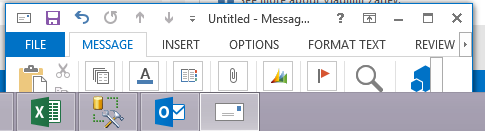
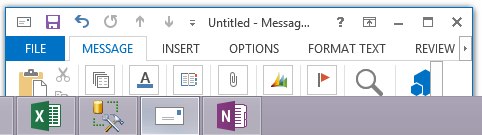
2: I close the main Outlook window but the new email message remains. The icon of the mail message stays the same in the Taskbar:
"Don't combine grouped buttons" (tweaker option)
1: Performing the same scenario with "Don't combine grouped buttons" option in 7TT with the "Always combine, hide labels" is the same as the above. scenario 1.
2: Now I close the main Outlook windows again. The icon of the new mail message changes to the Outlook icon! The Icon of the windows has not changed.
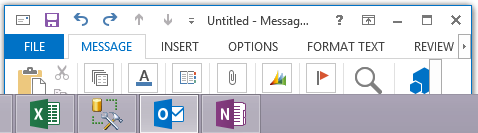
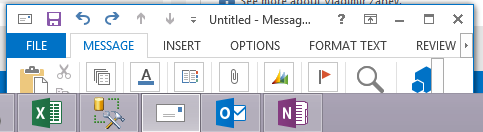
3: Once I open the Outlook main windows again the icons are displayed correctly again.
Things I have tried
I've tried to remedy the situation with other 7TT options.
- I Have tried the "Don't group" option, but in that case I always get the Main Outlook icon.
- Dragging a new email message into its own new group, this works but is cumbersome because it is not something I do by default.
What I hope you can fix in 7TT
I hope that in windows 10 you can bring back the way "Never combine, hide label" worked in Windows 8. Or force the correct icon to be shown in the taskbar when using "Don't combine grouped buttons".
Many thanks!!!
Hide Start Button not working with Win Threshold update
Since latest Threshold update 10 Nov Hide start button does not work.
Many thanks for app/

To change the applications order in the ALT+TAB menu.
To place applications as they're placed in the task bar in the ALT+TAB menu.
+ A possibility to change the order by right mouse button in the ALT+TAB menu.
I understand that it's not exactly about the software subject but it's sort of related to the task bar.
Возможность поменять порядок правой кнопкой мыши в меню ALT+TAB.
+ Располагать в меню ALT+TAB приложения в том виде как они на панели задач.
Я понимаю, это не совсем по теме программы, но всё же отчасти связано с панелью задач.
Mark Minimized Windows
Could not load library (4)
Older versions do the same thing too.
Must be some kind of incompatibilty, I think, cause the 7TT works well until end of september. Can be NVidia drivers update? I'm lost!!
Using Win7x64.
Customer support service by UserEcho


