
 In v2.5.1 Taskbar Inspector setting combine for an app to never causes explorer.exe to crash
I have set in Taskbar Inspector for certain apps combine to never.
In previous versions I could do this without any interruptions.
Now in the latest version 2.5.1 when I open Taskbar Inspector, select an entry, do a right click with the mouse and select combine -> never explorer.exe crashes and restarts.
This happens in Windows 7 and Windows 10.
Although the new setting is then in effect and the buttons are no longer combined the explorer.exe crash is annoying and I doubt this works correctly.
Can you please look into this and hopefully fix it?
Thanks.

Closing since the issue is very old, no other users reported about it, and the investigation stopped. If the issue is still relevant and you have more information, or would like to try other things to try and understand what's going on, let me know and I'll reopen the issue.

failed to decombine vmware
it seems both Vmware/QQ shows their tabs in taskbar just like normal windows, if and only if combing is enabled in system's setting
they could be using a hack or windows API to do this effect but what ever is it it's not handled by 7TT
decombing won't work, it always combine
the thumbnail preview is smaller normal windows, the preview can be disabled by 7TT but when i click the button the preview pop up just like grouped button
both vmware/qq won't show as combined when i have it disabled in system setting, however i don't like label, maybe it's easier if you can hide labels using 7TT so we use "never combine" option in system?
Windows 10 Ent, latest as of now
That's because VMware uses thumbnail previews. There's nothing to decombine, as there's actually only one taskbar item.
You can turn the feature off, see this answer.
I'm not familiar with QQ, perhaps it offers an option, too.

Version 5.1 - upgrade to 5.2.1
Version 5.1
Offers upgrade to 5.2.1 update starts, set ( ? ) And the old version. Those. simply updates the software.
-----------------------------
Версия 5.1
Предлагает обновиться на 5.2.1 Запускается обновление, устанавливается(?) и версия старая. Т.е. просто не происходит обновление программы.
Пока закрою. Если будет дополнительная информация, оставьте комментарий.
7+ Taskbar Tweaker 5.1 does not run Win10
7+ Taskbar Tweaker v5.1 dose not run on Windows 10 v1607 (Build 14393.105)
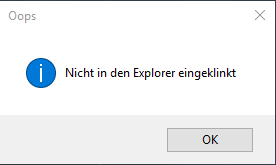
pleas fix it :-)

 Remove Edge pinned element
Since I got the Anniversary Update, Microsoft Edge appeared on my taskbar and there's no option to remove it from there. It seems Microsoft is forcing users to use it -.-"
Can you add an option to remove or hide it, please?

no proposed insertion point
In version 5.2 and the previous alpha release, there is no longer a proposed insertion point that indicates where the taskbar button will be moved to. The move still works, but it would be nicer if the insertion point was restored.

How about an option to hide the systray "show more icons" arrow?
This would help people like me who don't use it and want a minimalisic look.
Thank you for the suggestion. Closing as a duplicate in favor of:
Shift the whole system tray to the right when "Show desktop button" is disabled so it aligns with the right of the screen.
Shift the whole system tray to the right when "Show desktop button" is disabled so it aligns with the right of the screen.
Currently when you disable the button there is a 5mm gap between the edge of the button and the right side of the screen, it would be cool if this gap was removed so it sits flush with the bottom and side edge of the screen like the start button.

Give me the search icon back not the big search box
Now that Microsoft has disabled the ability in build 1607 to select a search icon instead of a search box and turn Cortana off altogether, can this be handled by 7+ ?
It seems like the option is still there in the new build.
Perhaps you were referring to something else?
7+ Taskbar not work. Please release new version as public beta for all 10 Anniversary users!
Kundesupport af UserEcho


