
 Taskbar Tweaker Could not Load Library
I downloaded the tool yet when I load it, it says that I have an insider build of Windows 10 (even though I don't even know how to check it or if I even have it at all) and when I loaded the tool, it says that it could not load library, error code 1004.
 Mouse wheel minimize/restore all group items
It seems like the current option "Minimize/restore when mouse is over" - "Taskbar buttons" does nothing when windows are grouped. Can you make is so that this will minimize/restores all group items.
I am not sure if this makes a difference, but the window group is originating from a pinned button.
My current workarounds are:
a. Right clicking the group and hitting: "Restore all windows"/"Minimize all windows"
b. taskbaritem|x1click 12, taskbaritem|x2click
But using the mouse wheel would be nice, since that is the behavior for non grouped buttons.
Beta Blocked by AVG/Avast
7tt_setup_beta.exe and the URL to the download are both blocked by Avast. I reported it as a false positive. Not sure if you would have better luck being the Dev or not.
The Stable version doesn't seem to be blocked.
Anyway. Just reaching out in case that bothers you. I'm sure its fine. Virustotal has about 8 generic reports. You probably can't justify dealing with the AV people for every beta build. (I wouldn't if I where you haha).
Thank you for your hard work. Appreciate you sharing your talent with us.

You're right about pretty much everything you said. Here's one of the most recent discussions about false positive detections, and there were many of those.
Thanks for reporting it to Avast. There's no special Dev status I'm aware of - when I submit a false positive, I do that using the commonly available form, and the false detection is usually removed after a couple of days.

Taskbar is not fully occupying the screen. The Show Desktop button is not at the very bottom of the screen when I have taskbar on the left/right.

You can see the empty space after the "show desktop" button when I have my taskbar to the left

Add option to make "Double click on empty space" or "middle click on empty space" for crtl-alt-tab or win-tab act as a toggle
When using "Double click on empty space" or "middle click on empty space" for crtl-alt-tab or win-tab, if that "view" is already open, close it, so it's easier to escape from accidental activation.

Incompatibility with Dexpot, a virtual desktop manager
Good day.
It's hard for me to describe in words the bug I found. I will try to describe in steps:
0) windows 10 20h2
1) in the 7+ Taskbar Tweaker program enable Hide start button option
2) in Dexpot program (https://dexpot.de/?lang=en - virtual desktop manager) enable plugin "Taskbar pager"
and the pager that appears on the taskbar will behave very strangely. to fix the situation, it is enough to remove the setting "Hide start button" in 7+ TT settings. Interestingly, installing a different start button hider (http://www.startkiller.com/ - StartKiller, for example) does not lead to this behavior.
Hope this bug gets fixed. Thank you.

Buttons change position
Some of the buttons change the position after starting the program
for example: WORD or EXCEL: After starting the Prog the button is move to the end of the list - but not always...
The program "Power Director" (Video-Editing Software) is always moving to the end.
I want to have the buttons in the order i choosed, to find the easier.
fix_hang_reposition is "1"
For Office apps in general, and Word and Excel in particular, I heard a number of complains about non-standard user experience behavior. See this comment, I believe that's the issue you're seeing. That's how Office was designed to work, and I don't plan to work around this with the tweaker.
I'm not sure what's about "Power Director", but I believe that's it's a similar situation in which a new window is created.
You might be able to mitigate this behavior by not disabling grouping or by using the option:
"When not grouping, place new items next to the existing ones"

Combine sticky notes not working
Using Win 10 Pro 1909 Build 18363.1198
Have taskbar set to group by app id, combine using taskbar settings (when full).
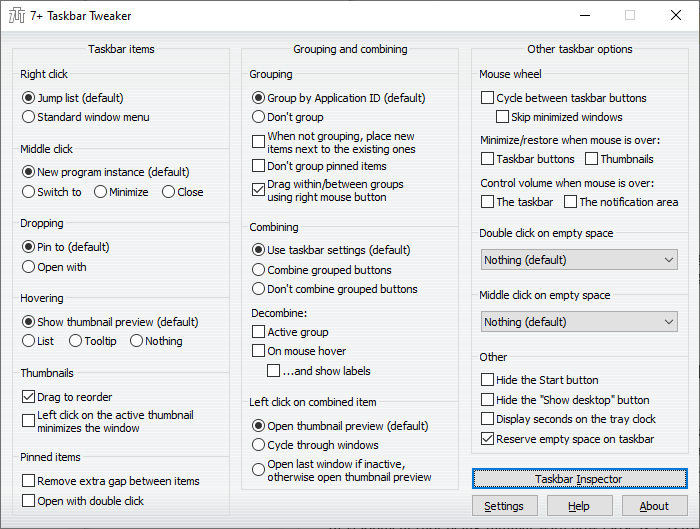
My 7+TT settings:
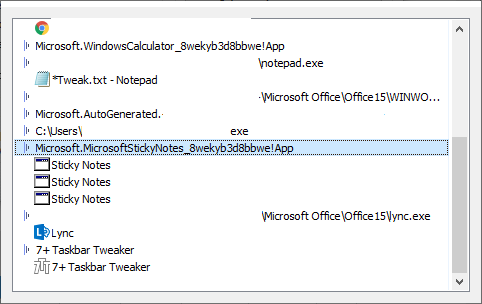
I went to Taskbar Inspector, right-clicked on Sticky Notes, and selected Combine | Always.
I got an error dialog something like “Cannot open library 5.”
The 7+TT window options all went gray.
After I rebooted, 7+TT came back, and the Sticky Notes showed "Combine: Always" in the inspector, but they are not combined in the taskbar.
Also, the combine and group features of Taskbar Inspector don't seem to do anything for other apps like Firefox.
Thoughts?
I'm not sure about the "Cannot open library 5" message. If you know of a way to reproduce the problem, please tell me.
Regarding the combining issue, see the discussion here:
Closing as a duplicate.

Remove gap not working on Surface Book 2 when detached in v5.10
In the most recent update, I ran into a small issue where removing the gap between items does not work when the screen is detached from the keyboard on my Surface Book 2 (not in tablet mode). There are no errors that are reported, and it works fine again when reattached. I have not checked if any other features are also impaired when attached. I remember this working prior to Windows 20H2 -- I was probably on a v5.9.x release.
Hardware: Microsoft Surface Book 2
Windows Edition: Windows 10 Pro
Version: 20H2
OS build: 19042.630
Experience: Windows Feature Experience Pack 120.2212.31.0
7+ Taskbar Tweaker: v5.10
Thanks for checking it out. It's only a minor inconvenience sometimes. I've been using 7+ Taskbar Tweaker for years -- fantastic tool! Great work :)

Start pinned item task away from pinned item group and after rightmost opened task
For Windows 10, when opening a pinned item, don't open it with/on it's icon but in normal order after the rightmost opened task. ie, after the task closest to the tray. For programs that can have multiple instances of itself open, it's more convenient and faster to just click the pinned item again vs from within the program or using a key combo.
If I understand correctly, the option you're looking for is "Don't group pinned items". Please let me know if you meant something else.
Customer support service by UserEcho


