
 Windows10 High DPI bug
I use two screen, so i windows dpi are 125% and 200%. in this case, this icon will have a lot of problem.
so i want to ask you, can you fix this problem by your programming ?
thank . tweaker is a very nice app.
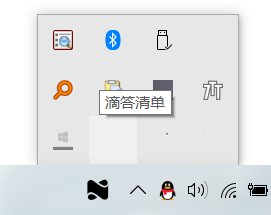
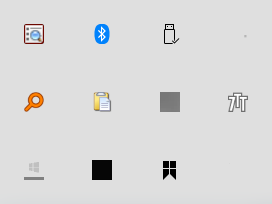

 Taskbar hidden notification area icons grid size
My hidden notification area icons currently display in a grid size of 4 x 4, but the grid size does appear to be random when icons are added / removed.
Is there a way (using Tasker or otherwise) to set the grid size default? eg 5 x 4?
Mirror taskbar
This tool is a life savior,
I didn't find any open subject on that, but would it be possible to add an option mirroring the taskbar, with tray icons on the le left (or top if in vertical mode) and task + win icons on the right (bottom).
Best regards

Thank you for the feedback.
Your suggestion is very similar to this one, so I'm closing it as a duplicate:
https://tweaker.userecho.com/topics/476-notification-area-on-all-displays-multiple-system-trays
Please see my answer in the topic above.

 Fix keyboard shortcut issue for never combine taskbar icons
For combined icons, opening the first window will be like Win+1, while opening second window will be like Win+11
When I uncombine icons, I expect it to work like Win+1 and Win+2 (the way it works for different applications), but it doesn't work that way

Show desktop button Windows 10
Please add Show desktop shortcut in Windows 10 panel like it was there in Windows XP. It;s inconvenient to click it on the right bottom corner, especialy if you have to monitors and mouse cursor jumps to another screen near border..

Ability to group/combine icons of different programs
I really dislike windows' default grouping policy of icons in the taskbar, I actually got to know this amazing program when trying to find a way to disable this feature.
I now believe it could be useful if it allowed me to group/combine icons of different programs (e.g., a mail, a spreadsheet, a browser window).
Would this be possible to achieve with 7TT?
Thanks again for your great work, keep it up!
Cheers,

Pinned Items and Open Pinned items Combining
I'm new to this, so maybe it's been suggested or there is a way to do it.
I'm trying to make my interface more like Linux, where the pinned items act more like application shortcuts that do not combine. I like to have my open items on my taskbar separate from the pinned items. Now what I'd really like is for open items to combine as they do in Linux, but not combine over their pinned item icon. I want them to combine on themselves.
For example, I'd like the two firefoxes to combine on the first one, but not on the pinned item. Is this possible?


Installation for all users
Would be nice to have an option in installer for a system-wide installation of 7TT. That is, elevated install/uninstall to/from Program Files (or Program Files x86), auto-run for all users, settings in HKLM.
I tried going the portable way, but despite running 7TT elevated it still had problems creating ini file (created but it was empty, and so were advanced settings) in Program Files. With portable install one also has to remember to add/remove 7TT to startup queue manually.

Kyboard shortcuts for "Combine taskbar buttons" in Windows settings and "Grouping and combining options" in program settings?
I'd imagine there's an Advanced Options -> Keyboard Shortcuts value for one of those, but I can't find any info on Grouping and combining taskbar button shortcuts anywhere. Any ideas?
change desktop by scrolling on taskview
switch between multiple desktop when scrolling on taskview.
Thank you for the suggestion. It was already suggested in the following topic, closing as a duplicate:
https://tweaker.userecho.com/topics/657-using-mouse-wheel-to-change-virtual-desktops-win-10
Kundesupport af UserEcho


