Your comments

Sorry, but I don't speak French.
Please provide the exact error message, as well as the version of your explorer.exe file.
The actual file is in C:\Windows, but the version of all of the explorer.exe files is the same. According to the version, you're using an insider build of Windows 10. You need to use the beta version of 7+ Taskbar Tweaker with an access code. Check out the beta version changelog and read about 7+ Taskbar Tweaker and Windows 10 insider builds.
Please check again, it should have a five-digit number after 10.0.
Or just make a screenshot of the file properties of explorer.exe.
There's no registry option for that. Also see the FAQ on the tweaker's website.
As for the failure, what's your version of 7+ Taskbar Tweaker? What's the version of your explorer.exe file?
Great, I'm glad you found and fixed the issue.
The stack trace that you posted looks unrelated to the tweaker. You can see inject.dll in there, but that's only because the tweaker hooks some of the explorer windows, so the messages go through it.
I see another thread on my computer which can be contributed to the tweaker, and it looks like this:
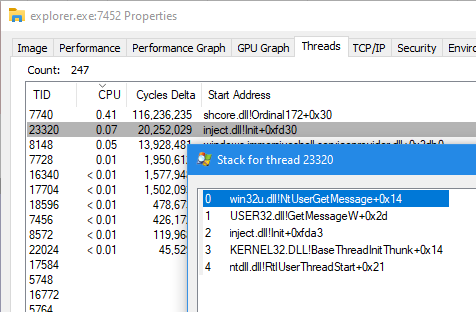
That's the mouse hook thread, and it's only running when one of the mouse-related tweaks is enabled (The "Mouse wheel" section on the upper right corner, and several advanced options).
For a start, try to disable the mouse-related options of the tweaker, and see whether you see any change.
So, my assumption was correct, it's being falsely detected by Symantec as malicious. That's not the first time that it happens, and I've seen Symantec's "ProcHijack" before. Unfortunately, there's not much I can do at this point - a debug build won't help. You need to contact Symantec and request to remove the false positive detection of 7+ Taskbar Tweaker. Meanwhile, if possible, you can add the tweaker's folder to Symantec's whitelist. After the false detection is not in place anymore, re-install the tweaker and it should work properly.
The beta version is very similar to the non-beta one. The only slight differences are the compatibility fixes. One reason I can think of for the behavior you're seeing is a security software, such as an antivirus - perhaps 7+ Taskbar Tweaker is falsely detected as malicious and is being killed. Unfortunately false positives are common for beta versions of 7+ Taskbar Tweaker which are not as popular. Try to add 7+ Taskbar Tweaker to the whitelist of your security software and see whether it solves the problem.
Customer support service by UserEcho


What version of 7+ Taskbar Tweaker are you using? According to the message, it's not the latest version. Please update to the latest version and see if it solves the issue.