نظرات شما

Here's an old version of the tweaker's page:
http://goo.gl/2Nqecu
You might want to read the third question in the FAQ, especially the BTW part.
I've removed it eventually as I thought it's quite obvious. Perhaps that's not true for everyone...
http://goo.gl/2Nqecu
You might want to read the third question in the FAQ, especially the BTW part.
I've removed it eventually as I thought it's quite obvious. Perhaps that's not true for everyone...
It's a registry option.
See help file (Advanced -> OptionsEx) for more details.
Here are .reg files you can use to apply the option:
https://www.dropbox.com/s/vpci3y51eyqqnh7/multipage_wheel_scroll.zip?dl=1
Remember to restart the tweaker for the option to apply.
See help file (Advanced -> OptionsEx) for more details.
Here are .reg files you can use to apply the option:
https://www.dropbox.com/s/vpci3y51eyqqnh7/multipage_wheel_scroll.zip?dl=1
Remember to restart the tweaker for the option to apply.
Have you seen the options Taskbar Inspector provides?
http://rammichael.com/wp-content/uploads/2009/09/Taskbar-Inspector.png
Having said that, it sounds like you're using the "Combine when taskbar is full" taskbar configuration. The tweaker doesn't support controlling which buttons to combine when this configuration is chosen. There's an open ticket for that, you might want to vote for it to express your interest:
http://tweaker.userecho.com/topic/179603-decombining-options-dont-work-as-expected-with-the-combine-when-taskbar-is-full-configuration/
http://rammichael.com/wp-content/uploads/2009/09/Taskbar-Inspector.png
Having said that, it sounds like you're using the "Combine when taskbar is full" taskbar configuration. The tweaker doesn't support controlling which buttons to combine when this configuration is chosen. There's an open ticket for that, you might want to vote for it to express your interest:
http://tweaker.userecho.com/topic/179603-decombining-options-dont-work-as-expected-with-the-combine-when-taskbar-is-full-configuration/
Hi,
Please refer to the first question of the FAQ, it has the answer you're looking for :)
http://rammichael.com/7-taskbar-tweaker#faq
Please refer to the first question of the FAQ, it has the answer you're looking for :)
http://rammichael.com/7-taskbar-tweaker#faq
Done in v4.3.1 as a registry option.
Since v4.3.1 Taskbar Inspector doesn't overlap the taskbar when it's set to auto-hide.
For now, you can easily make a batch file to quickly restart 7TT, using my small utility winapiexec:
http://rammichael.com/winapiexec
Closing 7TT would require:
winapiexec.exe u@PostMessageW ( u@FindWindowW "7+ Taskbar Tweaker" 0 ) ( u@RegisterWindowMessageW "7 Taskbar Tweaker" ) 0 1
Customer support service by UserEcho


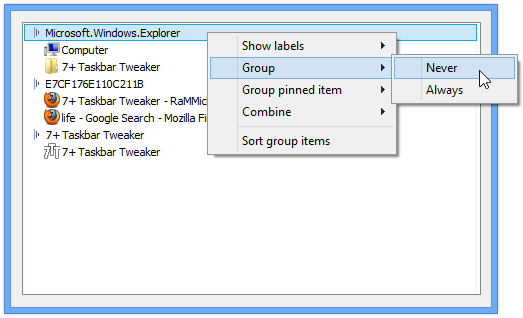
http://rammichael.com/wp-content/uploads/2009/09/Taskbar-Inspector.png
Having said that, it sounds like you're using the "Combine when taskbar is full" taskbar configuration. The tweaker doesn't support controlling which buttons to combine when this configuration is chosen. There's an open ticket for that, you might want to vote for it to express your interest:
http://tweaker.userecho.com/topic/179603-decombining-options-dont-work-as-expected-with-the-combine-when-taskbar-is-full-configuration/