Vaše komentáře

Did you try the options that I suggested in my previous comment? It should achieve what you're asking for.
You selected "Don't group", and so each Firefox button is independent on your taskbar. Refer to the help file of the tweaker for more details.
I didn't fully understand what you're trying to achieve. Can you post your tweaker settings?
If you want the two Firefox buttons to look like a single item, enable grouping and combining:
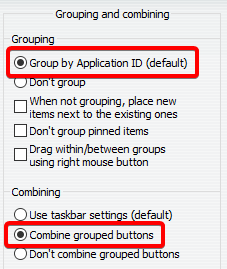
Oh, I actually implemented support for this scenario, the installer is launched as elevated:
https://tweaker.userecho.com/topics/286-automatic-updates-failed-when-uac-is-enabled
Currently, options are either in HKCU (non-portable) or in an ini file (portable). If you install 7+ Taskbar Tweaker in Program Files (non-portable), each user still has his own settings.
If settings are in HKLM, 7+ Taskbar Tweaker has to be running as administrator to be able to change them.
Because I didn't bother. Most users use the default path which doesn't require elevation.
By the way, if you uninstall from the control panel (or the new Apps and Features), the uninstaller is launched as administrator by Windows.
Currently, the tweaker doesn't provide such options.

Unfortunately, I don't know how to make it work. I can reproduce the problem, but what happens is that the taskbar doesn't receive any mouse wheel events at all. You can see it with the Microsoft Spy++ tool. The corresponding message is WM_MOUSEWHEEL.
Thank you for the suggestion. It was already suggested in the following topic, closing as a duplicate:
https://tweaker.userecho.com/topics/657-using-mouse-wheel-to-change-virtual-desktops-win-10
Služby zákaznické podpory by UserEcho


Why did you uncheck "Don't group pinned items"? Sorry for the misleading picture, I meant to refer only to the highlighted options. Please recheck "Don't group pinned items" and see if that's what you're looking for.