
 Error message "Could not load library (1004)" after 2020-08 Cumulative Update 2004 (KB4566782)
Hi.
After updating for last version of Windows 10 2004 (KB4566782) getting this error message.
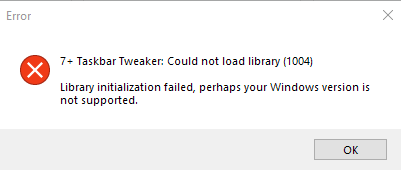
Installed version of 7+ Taskbar Tweaker 5.9.1

Bug: Windows Server 2008 R2
When I hover over the edge of the taskbar an arrow is shown (in order to resize the taskbar) and when I then hit the left mouse button, all the taskbar buttons disappear. The only way to get them back is to disable 7+ or to make the taskbar "fixed".
Unfortunately this also happens when I click somewhere on the taskbar (not just the edge where the arrow pops up) but I can't really figure out when this bug will make the taskbar buttons disappear exactly. But it does happen every time I leftclick the arrow (no need to actually resize the taskbar).
Very strange and annoying.

 Taskbar item user order was out-of-order after you switch win10's virtual desktops (use Ctrl + Win + Right/Left)
When I change taskbar item order by mouse drag
Then I switch win10's virtual desktop (use Ctrl + Win + Right/Left) to other desktop.
Then I switch win10's virtual desktop back.
Taskbar item order was changed, always order by program open order.
Has any way can save my order?

Try the virtual_desktop_order_fix advanced option.
See this post for more details:
https://rammichael.com/7-taskbar-tweaker-v5-2-with-support-for-windows-10-anniversary-update
You can access the advanced options by right clicking the tweaker's tray icon. Refer to the help file for more details.
Memory Leak error during Shut down Win 10 x64
Sometimes when shutting down Windows 10 x64 I get Memory Leak error which shows the memory amount & no other info. I have to again click Start > Shut Down to actually shut down. I have been able to track down the error to 7+ tweaker. This used to happen in previous installation of Win 10 too.

 Change the default install location
Currently, 7+ Taskbar Tweaker is installed as a subfolder at "%AppData%". Reading the Windows documentation, I found that the recommended place for applications installed on the user context is at "%LocalAppData%\Programs" ("https://docs.microsoft.com/en-us/windows/win32/msi/installation-context#folder-redirection").
Please move the default install from "%AppData%" to "%LocalAppData%\Programs".
If possible, add an option to install on the machine context ("%ProgramFiles%"). Maybe an "/AllUsers" argument, as OneDriveSetup.exe has ("https://docs.microsoft.com/en-us/onedrive/per-machine-installation#deployment-instructions").

icon grouping, similar concept as stacks in MacOs
a neat feature would be an option to combine multiple icons in one, like a virtual folder in the taskbar, in my case i would use it to combine the adobe suite and office suite apps so i don't use so much icons on taskbar, also a neat integration would be the "open with" feature so if i drag a PSD file to the group this opens and then i can drag to photoshop for example and open the file with photoshop (i know this feature is currently available i just mention it for an idea of how this would work)
combine the adobe suite and office suite apps so i don't use so much icons on taskbar
You can do it. Either use the "Drag within/between groups using right mouse button" option, or use Taskbar Inspector to change the Application ID of the target windows. The "Open With" option will work with the newly created group only if it stays with the relevant Application ID, for example the ID of Photoshop if you want it to be triggered.

Hiding the date while using large taskbar icons
It would be nice if there was an option to hide the date when the 'use small taskbar buttons' is unchecked. That would be a nice option to have.
Also, another idea. There is an old piece of software called ShyBar that hides the 1-pixel horizontal line of the taskbar even when you have the taskbar hidden. It would be great if that functionality was included in the 7+ Taskbar Tweaker software. ShyBar also doesn't work right with multiple monitors.
Thank you for the suggestion. Such an idea was already suggested before:
https://tweaker.userecho.com/topics/424-option-to-hide-timedate-strings-in-taskbar
Also see:
https://tweaker.userecho.com/topics/32-custom-date-format
Closing as duplicate.
VirusTotal flagging 7tt
VirusTotal reporting 1/72 scanners reporting a virus. My work IT just had a little panic because they scanned my machine and VirusTotal flagged 7tt as a virus. Can you look into possibly updating 7tt so it passes VirusTotal? That's what my work uses so that's what I need to come up 100% clean.
Thanks
That’s a false positive detection. False positives are unfortunately common for 7+ Taskbar Tweaker. Please see the FAQ here and this blog post.
I'm afraid that there's not much that I can do. From my experience, updating the tweaker only makes things worse, since new files are falsely detected by many antiviruses until they whitelist the new version.
You can try to contact the relevant company, SecureAge, and ask them to remove the false detection.

Пожалуйста см. мой ответ здесь:
https://tweaker.userecho.com/topics/1025-hiding-the-date-while-using-large-taskbar-icons
Thanks for the suggestion. It was suggested before, closing as a duplicate:
https://tweaker.userecho.com/topics/657-using-mouse-wheel-to-change-virtual-desktops-win-10
Сервис поддержки клиентов работает на платформе UserEcho


