
 4.4.2 treats every group as combined
For example, even if the group is uncombined, pressing a taskbar button won't bring that window to front/minimize/restore it as expected, but act as on the "Left click on combined" setting.
This bug was not present in 4.4.0
 How to download?!
I try to update. The function on the product itself fails. Going to the website I can only find he link on the product page. I think I remember that was the way to download. But whatever I try in various web browsers, left clicking, or right clicking trying various options, nothing works!

You might want to try Softpedia:
http://www.softpedia.com/get/Tweak/System-Tweak/7-Taskbar-Tweaker.shtml

Drag'n'drop file on top of quicklaunch icons
hi!
i have old-school quicklaunch panel on tasskbar.
when 7+TT is not loaded, i can drag file atop of the icon and open it with corresponding application (say, open mp3 with winamp, adobe audition or mp3DirectCut or pang with photoshop, imageviewer or paint, for example)
but when 7+TT is loaded, i cant do this and get "not available" cursor (\)
pressing shift won't help in this case (as it helps with taskbar buttons)
to be clear: i'm talking not about adding a file to the quicklaunch (which works either 7+TT is loaded or not and cursor changes to "add item" cusor when hovering certain areas of quicklaunch)

Cant install update version 4.2.7
Unsupported 16-Bit Application
---------------------------
The program or feature "\??\C:\Users\Vladimir\AppData\Local\Temp\stt6DC0.exe" cannot start or run due to incompatibity with 64-bit versions of Windows. Please contact the software vendor to ask if a 64-bit Windows compatible version is available.
That's a DNS issue.
I've switched to a different hosting yesterday, and it seems like the new DNS addresses hadn't fully applied yet.
For now, you can update manually.
Grab the tweaker here:
https://dl.dropboxusercontent.com/u/57395470/temp_html_rammichael_com/files/7tt_setup.exe
 Reserve empty space on taskbar - new option
Thank you
Eliminate the yellow bubble help
If this is something that can eliminated, by this utility, that would be great.

Raise and minimize all windows in a group/combo at once?
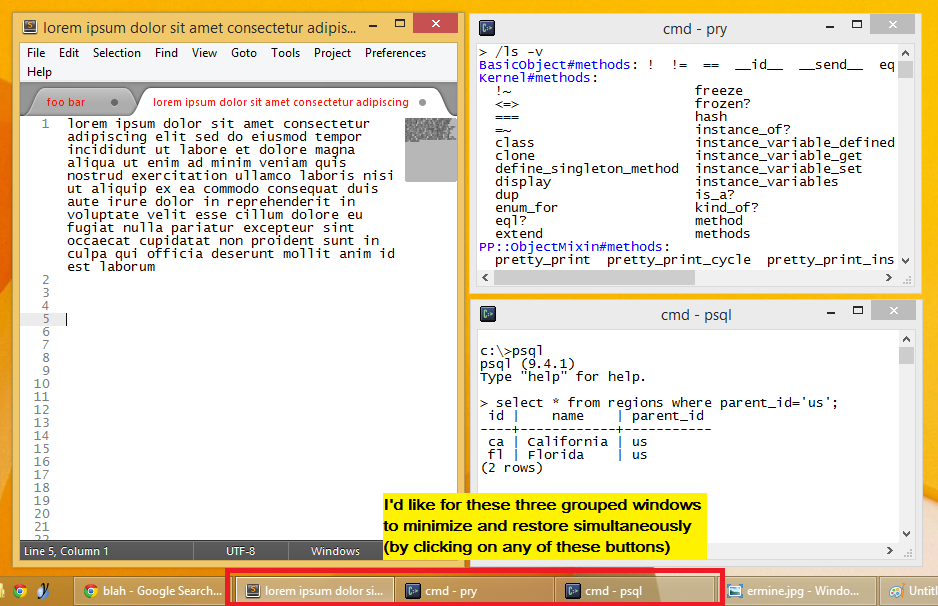
alternative image source: http://i.imgur.com/zYAkgC2.png
My current 7TT setup is left mouse button always raises a window and right one always minimizes. And clicking on any of grouped taskbar items would produce an effect as if I clicked on every item (such that they all hide or restore).
It would be useful in taskbar items combined mode too. Could be an advanced setting, example usage:
taskbargroup|lclick = 1 // bring all combined items up
taskbargroup|rclick = 2 // minimize them

// and while we're at it :)
thumbnail|rclick = 2 // minimize a single window
Left click on UNcombined item should open the clicked window [Windows 10]
I use option "Don't combine grouped items". Left click on uncombined item acts the same as option "Open last windows if inactive, otherwie open thumbnail preview". But I rather want that the clicked window is opened (or minimized if active) - the same functionality as if you set the native windows taskbar option "Never combine" (but with hidden labels).
Lose Right Click menu with V. 4.5.5
Asiakastuen palvelu UserEcho



