Kommenttisi


Unfortunately, I don't know how to make it work. I can reproduce the problem, but what happens is that the taskbar doesn't receive any mouse wheel events at all. You can see it with the Microsoft Spy++ tool. The corresponding message is WM_MOUSEWHEEL.
Thank you for the suggestion. It was already suggested in the following topic, closing as a duplicate:
https://tweaker.userecho.com/topics/657-using-mouse-wheel-to-change-virtual-desktops-win-10
I've added the sndvol_step advanced option to the newly added beta version, v5.10.0.2. Please try it. Refer to the help file for details.
Thanks for the suggestion. Such a topic already exists:
https://tweaker.userecho.com/topics/1017-option-to-change-volume-step
Closing this as a duplicate.
For some reason, the spam filter marked this topic, and I noticed it only now by accident.
There's also the following suggestion which is similar:

Last time I checked, overriding system global hotkeys was only possible if they're disabled for system use in the system registry. See this article: Disable Global Hot Keys
See also my answer here: Switching between open programs using keyboard
I'm not sure whether that still works in the latest Windows 10 versions. But even if it is, the tweaker doesn't have a keyboard action to switch to a window according to its placement on the taskbar.
It's similar to the following topic:
https://tweaker.userecho.com/topics/285-center-taskbar-icons
It's not possible at this time.
Great. Regarding the unlimited width, I'm not familiar of such a configuration, and the tweaker has no relevant option for that.
Try setting the always_show_tooltip advanced option to 2. Refer to the help file for more details.
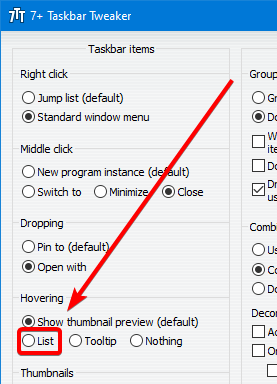
By the way, setting the Hovering -> List option in the tweaker has the same effect as setting NumThumnails.
Asiakastuen palvelu UserEcho


Currently, the tweaker doesn't provide such options.