Dine kommentarer

Works for me on the same version. Did you adjust the "no_start_btn_spacing" advanced option properly?

Perhaps you're using Windows 10 version 1709. Check out my answer here:
https://tweaker.userecho.com/topics/959-could-not-load-library-5
The function is quite straightforward, and wasn't changed for years. I suspect that the target application or the OS have to do with the behavior you're seeing.
You can get previous versions of the tweaker here:
https://www.dropbox.com/sh/mcbychsh0xc1dvu/AAC7NwQTQ-tOTNL2BUZ_CwUua?dl=0
You can also compare the behavior with the behavior of other programs, such as the Task Manager.
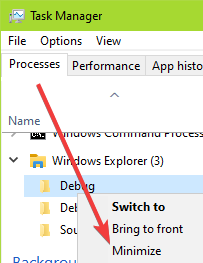
Let me know if you find out that it worked properly in a previous version of 7+ Taskbar Tweaker (and in this case, which version introduced the issue).
Use the beta version. More details:
https://tweaker.userecho.com/topics/959-could-not-load-library-5
There are other programs that provide such functionality. One is Switcheroo (I haven't used it myself).
Is it McAfee? Unfortunately there's not much I can do about third-party antivirus products. I tried to contact McAfee about it but got no reply. As a customer, please contact your antivirus' support team and ask them to remove the false positive detection.
About a non-beta version that supports the KB4520006 update, I don't plan to release one in the near future. Windows 10 version 1709 is out of support except for enterprise clients, which will only last until April. The version not widely used, and I'm reluctant to disrupt all users with such a specific update.
Sorry for the non-helpful reply, but the proper way to solve this is to get your antivirus to remove the false detection from the beta version of the tweaker.
See my answer here:
https://tweaker.userecho.com/topics/959-could-not-load-library-5
There's a way to achieve this, please see my answer here:
Which build of Windows 10 are you using? Check this topic, perhaps it will solve the problem for you:
https://tweaker.userecho.com/topics/959-could-not-load-library-5
Kundesupport af UserEcho


That's possible with Taskbar Inspector. Refer to the help file that comes with the program for more details.