التعليقات الخاصة بك

Thank you for the suggestion. Such an idea was already suggested before:
https://tweaker.userecho.com/topics/424-option-to-hide-timedate-strings-in-taskbar
Also see:
https://tweaker.userecho.com/topics/32-custom-date-format
Closing as duplicate.
combine the adobe suite and office suite apps so i don't use so much icons on taskbar
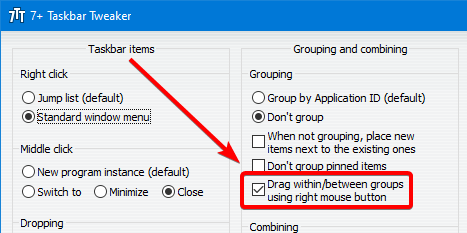
You can do it. Either use the "Drag within/between groups using right mouse button" option, or use Taskbar Inspector to change the Application ID of the target windows. The "Open With" option will work with the newly created group only if it stays with the relevant Application ID, for example the ID of Photoshop if you want it to be triggered.

The incompatibility is fixed in the newly released beta version, 7+ Taskbar Tweaker v5.9.0.6.
Windows 10 Version 2004 with latest updates should be supported by 7+ Taskbar Tweaker v5.9. Perhaps you're using an insider version of Windows 10?
Can you please specify the version of your explorer.exe file? The latest version should be 10.0.19041.388.

That’s a false positive detection. False positives are unfortunately common for 7+ Taskbar Tweaker. Please see the FAQ here and this blog post.
I'm afraid that there's not much that I can do. From my experience, updating the tweaker only makes things worse, since new files are falsely detected by many antiviruses until they whitelist the new version.
You can try to contact the relevant company, SecureAge, and ask them to remove the false detection.
Thanks for the suggestion. It was suggested before, closing as a duplicate:
https://tweaker.userecho.com/topics/657-using-mouse-wheel-to-change-virtual-desktops-win-10
That's a known issue. Also see my comment here:
https://rammichael.com/7-taskbar-tweaker/comment-page-44#comment-11381
Indeed, the solution is to make the taskbar a bit wider than the possible minimum.
Do other options work for you?
Did you enable the corresponding option?
خدمة دعم العملاء من خلال UserEcho


Пожалуйста см. мой ответ здесь:
https://tweaker.userecho.com/topics/1025-hiding-the-date-while-using-large-taskbar-icons