التعليقات الخاصة بك


A duplicate. See my reply here:
http://tweaker.userecho.com/topics/65-dont-work-in-windows-10-build-11099/
OK, I figured that you were probably using the beta version, and I could reproduce the issue. I've released a new beta version which should fix it.
I've implemented it in the following way: if the command starts with .\, the dot is replaced with the path of 7+ Taskbar Tweaker.
So you can use the following command line: ".\7+ Taskbar Tweaker.exe".
Try the new beta and let me know whether it works for you.
Perhaps you're using the "Combine when taskbar is full" option in the taskbar properties?
When used with "Decombine: On mouse hover" option, it can cause similar glitches.
If not, please post your tweaker settings and taskbar properties, and if possible, a video showing the bug, and I'll try to reproduce it.
I don't plan to implement it, as the request is not very popular, but you can add the option yourself with some effort.
You can find the instructions here:
The following configuration works for me on Windows 10. Clicking on the Show Desktop button shows the Alt+Tab window. Can you re-check which version of 7+ Taskbar Tweaker are you using?
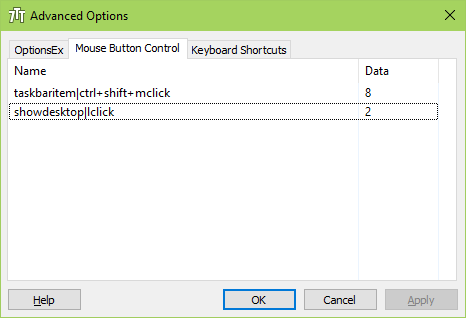
i'm trying for example "showdesktop|mclick" with values from "emptyspace" paragraph in help file, but no effect
Works for me. Which Windows version are you using?
are you planning to add "run program" function to advanced menu?
That's possible using the following steps:
The icons behaved in the same way in Windows 7 as they do in Windows 10.
خدمة دعم العملاء من خلال UserEcho


Closing as a duplicate.
http://tweaker.userecho.com/topics/287-ability-to-run-application-or-even-better-trigger-a-media-button-on-clicking-on-empty-taskbar-space/#comment-2718