
 icon disappears on active program(s)
I'm using Express Scribe and Microsoft Word on a Dell laptop running Windows 7 (yeah, I know, it's old). After a minute or two the taskbar icons disappear. If I switch to another program, say Firefox, the icons reappear.
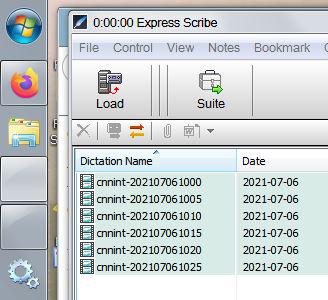

According to your Firefox icon which is cut off a bit, my guess is that you're using the no_width_limit advanced option, and you made your taskbar too narrow. Unlock it and enlarge it just a little bit, so that the icons are not cut off. Let me know if that fixes the problem.

 Windows 11 Questions
Hello,
I was looking at the list of deprecations/feature removals in windows 11.
https://www.microsoft.com/en-us/windows/windows-11-specifications#primaryR4
Seems Like MS is going to prevent users from changing the alignment of the task bar, and also stop apps from customizing the taskbar. I hope that does not kill this project on windows 11 and newer going forward. Have you had a chance at what is out their for 11 to know how strict this lockdown of customization will be?
Thanks,
Keith
Please see the newly released blog post:
7+ Taskbar Tweaker and a first look at Windows 11

Volume control in notification area not working with touchpad scroll
Hi,
I am running 7TT v5.11.2 on Windows 10.0.19014. My laptop is a Lenovo Yoga C930, and I'm using Windows 10's built-in touchpad drivers with gestures enabled. Scrolling is assigned to two-finger drag (default).
Changing the volume when hovering over the taskbar / notification area and scrolling does not work when I try to do it with the touchpad. Specifically, when I place the cursor over the taskbar or notification area and perform a two-finger drag gesture to scroll, nothing happens.
Scrolling with a USB mouse or any other USB HID device that supports scrolling works fine, it's just the touchpad that it has trouble with.
Thank you for reporting the problem. I'm familiar with it, but unfortunately, I don't know how to fix it.
The problem was reported before:
https://tweaker.userecho.com/826-scroll-on-trackpad-doesnt-trigger-mouse-wheel-options
I'm closing this topic as a duplicate.

uwamson
I installed the current beta version 5.11.2.1 last Friday (6/18), and a couple of days ago Windows Security found Uwamson.A!ml and said it was a PUP associated with 7TT, so I quarantined it.
What does this mean?
Thanks!
It's a false positive detection. See the discussion here:
https://rammichael.com/7-taskbar-tweaker/comment-page-50#comment-12663

Explorer crashes
Faulting module name: inject.dll, version: 5.10.0.0, time stamp: 0x5f9c0eca
Exception code: 0xc0000005
Fault offset: 0x000000000000ea30
You're not using the latest version, please update to the latest version of 7+ Taskbar Tweaker.
No longer combining Sticky Notes by app ID
Until recently, 7+TT was combining my sticky notes, but for the past week or so (might have been with v5.11.1), it is no longer grouping them. I have my Windows taskbar settings set to Never combine and 7+TT set to always combine the sticky notes by app id. This is with v5.11.2, and I even tried fully uninstalling and reinstalling 7+TT.
Using it in Win10, of course.

 Maintain chocolatey package for command-line installation
Chocolatey is a command-line package manager for Windows, similar to apt-get for linux or npm for nodejs.
Someone has provided a package for 7TT there Chocolatey Software | 7+ Taskbar Tweaker 5.8,
which means I can run `choco install 7-taskbar-tweaker` from a Powershell prompt for a quick and silent install.
Unfortunately it's still on 5.8 and hasn't seen an update since oct 2019, which fails to
If the developer of this software saw the value in using a package manager and decided to maintain a chocolatey package himself, this would solve the time gap often seen between a new release and the availability of a choco package for it.
I suppose since you own the release process, you'd be able to make the update automatic.
GDATA AV reports http://rammichael.com/downloads/7tt_setup.exe?version&changelog=... as infected
Probably false positive, nevertheless, GDATA AV reports that a virus was found when loading web content from http://rammichael.com/downloads/7tt_setup.exe?version&changelog=5.11.2. It subsequently blocks the balloon/popup note that would notify you of an update and provide the update button/link - making it impossible to update the program from within. However, there is no alarm when manually downloading and installing the program.
The version number mentioned above is only an example; it's been doing that for the last 5 or so versions.
The mentioned link merely reports the latest version of the tweaker, along with the changelog. It isn't, and can't in any way be a virus, it's just text.
Unfortunately, I have no control over third party antivirus vendors. If you are a customer, please contact their support and report the problem.

Constant crashing + reloading Windows 10 task bar, every time I click anywhere on it - since new Windows update
Since Window 10 updated to include the bullsheet news toolbar thing, the whole task bar is unusable - crashing and reloading EVERY time I click it. If I close 7+ tweaker, everything is fine. This happens on both my laptops.
I've tried disabling the news toolbar (I don't miss it) but it doesn't help.
new version is recognized as security threat by multiple sources v5.11.2
Norton Security (SONAR.ProcHijack g43, g45, g47)
Windows Smart Screen
Google Chrome
They all reported malware today
Unfortunately, false positives are common among newly released 7+ Taskbar Tweaker versions. It's not specific to v5.11.2, virtually every version has this issue. Usually, antivirus vendors remove the false detection a couple of days after it's being reported to them.
This problem is mentioned in the FAQ, and was discussed dozens of times in the blog comments, for example:
https://rammichael.com/7-taskbar-tweaker/comment-page-43#comment-11035
https://rammichael.com/about/comment-page-4#comment-10292
And many others. Searching for "False positive" yields more than 170 comments on my blog.
There's also the blog post of Nir Sofer, Antivirus companies cause a big headache to small developers, which has a great description of the problem.
Customer support service by UserEcho


