Uw opmerkingen


Unless you meant something else, there's a registry option for that:
https://www.tenforums.com/tutorials/104754-change-width-taskbar-buttons-windows.html
Sorry, I don't quite follow. Did you solve your issue?
Another example of what?
Should be fixed in v5.11.3.2 beta.
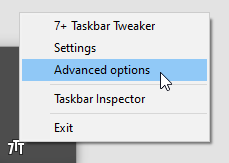
You can access the advanced options from the main window context menu or from the tray icon context menu.

It's already possible, please refer to my answer here:
Sorry, but I don't speak German.
For the status regarding Windows 11, please refer to the recent blog posts:
I'm sorry, but I'm having a hard time understanding the issue from your post. If you can post a video that demonstrates the problem, that might help.
When you asked me to run procdump64.exe, you meant to download and use the procdump package from Microsoft website by Sysinternals, right?
Right.
while running the procdump64, the Alt+Tab degrades to a Windows XP look, not showing tiles but just icons.
This happens because ProcDump acts as a debugger, and explorer turns off the modern Alt+Tab when it's being debugged. You can disable this behavior by setting the AltTabSettings value in the registry to 2, as shown in this tutorial:
https://winaero.com/how-to-get-the-old-alt-tab-dialog-in-windows-10/
Note that the tutorial says to change the value to 1 which disabled the modern Alt+Tab, but setting it to 2 keeps it even when explorer is debugged.
Customer support service by UserEcho


Fixed in v5.12.