Uw opmerkingen

Please specify your tweaker version, and provide exact steps to reproduce the problem. Thanks.
11 jaar geleden

I meant the "Always combine, hide labels" property option, which can be called "Never combine, hide label" if used together with the "Don't combine grouped buttons" tweaker option. With or without the tweaker, the "Always combine, hide labels" option chooses an icon for a taskbar item based on the item's group, as specified in the link below that I posted.
> What about the ability to set the max width of Taskbars items via 7TT?
It might work, but I think that the solution that the tweaker provides now is superior, as specifying a correct width value can be tricky. Currently, it mostly works well, except for the icons limitation. I might look at this in the future.
> What about the ability to set the max width of Taskbars items via 7TT?
It might work, but I think that the solution that the tweaker provides now is superior, as specifying a correct width value can be tricky. Currently, it mostly works well, except for the icons limitation. I might look at this in the future.
It's a known limitation of the "Never combine, hide label" mode. The displayed icon is the group icon. More information:
http://blogs.msdn.com/b/oldnewthing/archive/2015/08/12/10634556.aspx
I remember trying to bypass it in the tweaker, but couldn't come up with a good solution.
http://blogs.msdn.com/b/oldnewthing/archive/2015/08/12/10634556.aspx
I remember trying to bypass it in the tweaker, but couldn't come up with a good solution.
Please try v4.5.10.9 beta.
I don't use Outlook, but it sounds like something that has to be implemented/fixed in the program itself.

I have checked it on my Windows 10 PC, and it starts as expected.
Do you see 7+ Taskbar Tweaker in the startup list? Perhaps it was mistakenly disabled?
Do you see 7+ Taskbar Tweaker in the startup list? Perhaps it was mistakenly disabled?
Your request was implemented in the latest beta version, 4.5.10.7.
Do you mean that dragging with the right mouse button does nothing unless you uncheck and re-check the option?
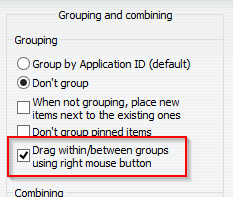
Do you have a way to reproduce it?
Do you have a way to reproduce it?
Customer support service by UserEcho

