התגובות שלך

What is the issue here? This option modifies the left click action, not the right click action.
11 שנים ago

It's possible with 7+ Taskbar Tweaker v5.0 using the Mouse Button Control advanced options, although it's not too straightforward.
Let's assume that we want to launch explorer every time we hold Ctrl and left-click the taskbar. Here's how it can be done:
Let's assume that we want to launch explorer every time we hold Ctrl and left-click the taskbar. Here's how it can be done:
- Add the shortcut to the Advanced Options editor, and set the data to an unassigned value, e.g. 1000.
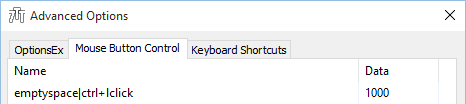
- Hold Ctrl and left-click the taskbar (or use the click that you have set). If it was done correctly, Notepad will be launched.
- Open regedit and navigate to
HKEY_CURRENT_USER\SOFTWARE\7 Taskbar Tweaker\Strings. You'll see thecmdline_1000value, where 1000 is your number. The value data will benotepad.exe, which is the default command line generated by the tweaker.
If you're using the portable version, look for the value in the .ini file.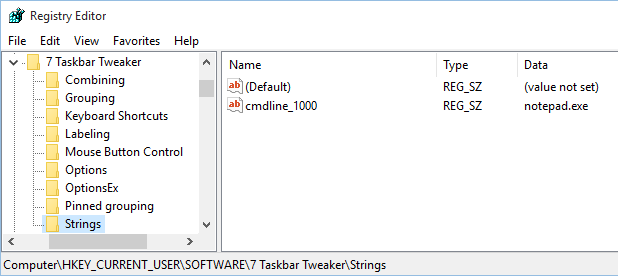
- Set this value to the command line you'd like to be launched for the click that you have assigned. In our case, the new command line will be
explorer.exe.
Closing due to a lack of feedback. If this is still relevant, please leave a comment.
Closing due to a lack of feedback. If this is still relevant, please leave a comment.
Starting with 7+ Taskbar Tweaker v5.0, Windows 10 is fully supported.
Fixed in v5.0.
Fixed in v5.0.
The options are available in v5.0.
Customer support service by UserEcho