Dine kommentarer


7+ Taskbar Tweaker doesn't have such option. You might want to consider changing your DPI settings.

Are you using the disable_topmost advanced option?
Hi,
Thanks for the feedback.
I don't plan to implement the feature in the tweaker, because, well, it's 7+ Taskbar Tweaker. Having said that, there are programs which are designed to solve this issue. One that I'm aware of is WizMouse. I haven't used it myself, but as far as I know, it works as expected, and doesn't conflict with 7+ Taskbar Tweaker.
Thanks for the feedback.
I don't plan to implement the feature in the tweaker, because, well, it's 7+ Taskbar Tweaker. Having said that, there are programs which are designed to solve this issue. One that I'm aware of is WizMouse. I haven't used it myself, but as far as I know, it works as expected, and doesn't conflict with 7+ Taskbar Tweaker.
There's the "Drag within/between groups using right mouse button" option, which allows to move windows between groups.
You can hold Shift to get the other menu, as mentioned in the help file. For more customization, you can use the Mouse Button Control advanced options. See the help file for more details.
That's not possible. Please read the FAQ here.
As for CPU usage, it's nearly zero. The only thing the tweaker does in the background is checking for updates every 24 hours, if the option is enabled. Other than that, it's completely idle (except when you open the GUI or restart explorer).
As for CPU usage, it's nearly zero. The only thing the tweaker does in the background is checking for updates every 24 hours, if the option is enabled. Other than that, it's completely idle (except when you open the GUI or restart explorer).
Have you enabled the relevant option?
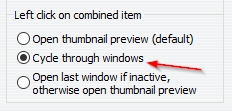
Does ... mean that previews will always show when you hover an application in the taskbar?It means that the hover settings aren't affected by the disable_items_drag advanced option. If previews appear without it, they should also appear with the option.
Kundesupport af UserEcho


In general, this error message means that the downloaded file is corrupt, probably because of a server error. In v4.5.10, the error reporting was improved, but perhaps it still isn't good enough.
Can you please upload the file in the path that is specified in the message box?
e.g. for the message box above, Thanks.