Vaše komentáře


That's already possible by using the Mouse Button Control options in the Advanced Options. Please refer to the help file for more information.
No, there's no way to automate it with 7+ Taskbar Tweaker.
If you're a programmer, you can come up with a solution by using the 7+ Taskbar Tweaking Library:
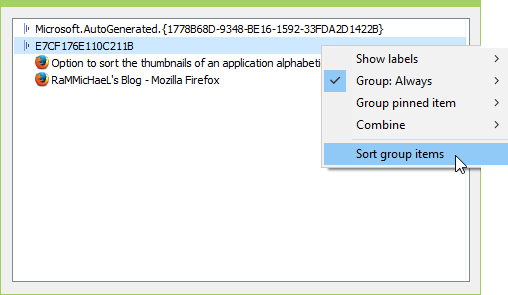
There's the option to sort by name in Taskbar Inspector. It doesn't keep the windows automatically sorted, but that's better than nothing, I guess.
This issue exists only for the portable version, due to the syntax of the .ini file entries.
Yes, insider builds are not supported.
There's a post about this:
http://tweaker.userecho.com/topics/65-doesnt-work-on-insider-builds-of-windows-10/
Yes, insider builds are not supported.
There's a post about this:
http://tweaker.userecho.com/topics/65-doesnt-work-on-insider-builds-of-windows-10/
7+ Taskbar Tweaker is installed to the AppData folder by default. By doing so, it doesn't require administrator rights. Note that it's not portable: it uses the system registry.
If you prefer, you can run the installer as administrator, and install the tweaker into the Program Files folder by selecting it explicitly.
Like the sndvol_tooltip advanced option does?
Služby zákaznické podpory by UserEcho


An alpha version for Windows 10 Anniversary Update is available here:
http://rammichael.com/7-taskbar-tweaker-for-windows-10-anniversary-update-early-alpha-version